
W e've met with a lot of companies about their CMS lately.
We’ve met with a lot of companies about their CMS lately. Most came to us with the same story. Their websites still ran on a platform last upgraded before 2019.
Every landing page needed a developer ticket. Publishing a blog post meant resizing images by hand in Photoshop. When traffic spiked, the site crawled.
They asked the question many teams are asking in 2026. Should we migrate? The short answer is usually yes. The longer answer is more strategic, and worth unpacking.
A modern CMS is not just a publishing tool anymore. It is the operational backbone of your digital presence. It is the difference between teams that ship in hours and teams that file tickets for weeks.
Here is what actually changes when organizations move from legacy platforms to modern CMS architecture.
Speed Still Matters More Than Teams Think
Website performance is one of the most measurable outcomes of a CMS migration.
Modern CMS platforms are built around API-first architectures. Content lives in one system and gets delivered anywhere through APIs, instead of being locked into page templates. Developers can build front ends with frameworks like React, Next.js, or Vue, which dramatically improves performance and rendering speed.
In practice, that means faster pages. Lower bounce rates. Better search visibility.
The data backs this up. Pingdom found that pages loading in one second have a 7% bounce rate, while pages that take five seconds have a 38% bounce rate. Akamai reported that a two-second delay in load time increases bounce rates by 103%. Conversion rates drop an average of 2.11% with each additional second of load time.
Newer CMS platforms also handle databases and caching more efficiently, which reduces server load and improves response times.
Security is a Quiet but Expensive Problem
Most organizations delay CMS migration until something breaks. Usually that something is security. Outdated CMS platforms lean heavily on plugins, extensions, and old authentication systems. Those age fast. Attackers know it.
SiteLock found that the average website experiences 94 attacks per day, and most successful breaches trace back to outdated CMS core software, plugins, or themes that exploit known, already-patched vulnerabilities. WordPress sites are 39 times more vulnerable than non-CMS sites, according to Sectigo’s research.
Modern CMS platforms address this in three ways.
Architecture comes first. The front end and content repository are separated, which limits direct database exposure. Second is updates. Security patches push frequently and automatically. Third is governance. Role-based permissions, audit logs, and compliance controls make life easier for regulated industries — healthcare teams managing HIPAA, financial firms navigating SOC 2, ecommerce brands handling PCI.
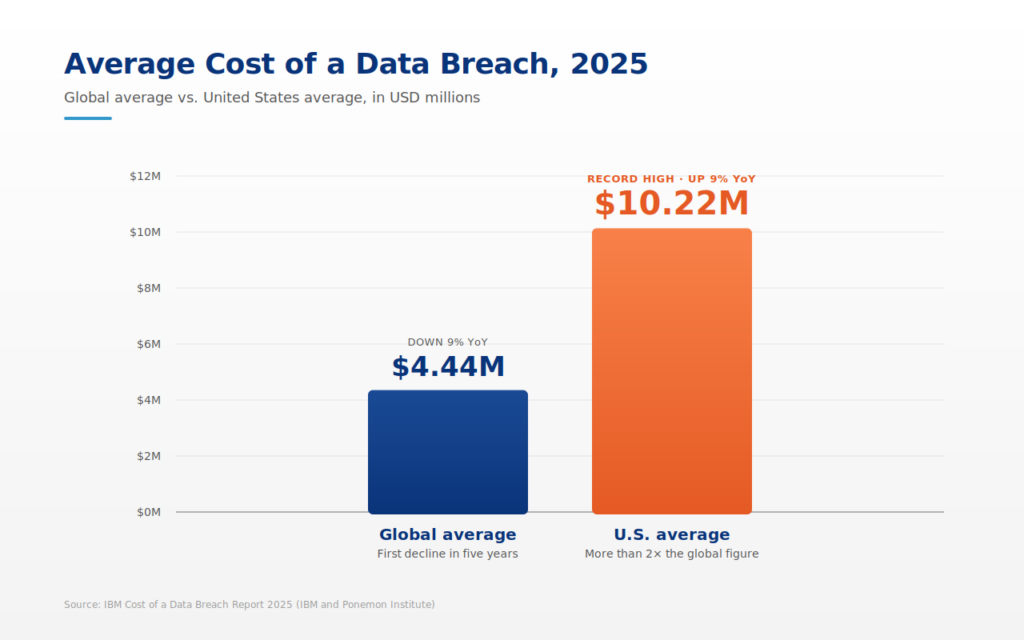
Security rarely excites a marketing meeting. But the 2025 IBM Cost of a Data Breach Report puts the global average breach cost at $4.44 million, and the U.S. average at a record $10.22 million. At those numbers, it gets memorable fast.
The Real Advantage: Editorial Velocity
Here is the part most teams miss. CMS migration is not really about infrastructure. It is about workflow.
Legacy systems force content teams to depend on developers for routine changes. Update a hero banner. Add a landing page. Fix a broken component. Ticket. Wait. Deploy.
Modern CMS platforms flip that model. Content becomes modular. Editors assemble pages from components instead of editing raw templates.
Tools like Optimizely’s CMS cut friction across the full content lifecycle. A visual builder with drag-and-drop tools lets non-technical teams build and publish without a dev queue. A centralized hub manages, reuses, and distributes content across web, email, and in-app channels without duplication. AI-assisted authoring is now table stakes.
Sometimes the biggest return on investment is simply removing friction. Research from Forrester, cited in recent CMS migration analysis, found that 53% of CMS migration initiatives exceed budget or fail to deliver expected outcomes — usually because teams treat migration as a lift-and-shift rather than a workflow redesign.
Multi-channel Publishing is no Longer Optional
In 2018, most websites had one primary destination. The website.
Today content flows everywhere. Web. Mobile apps. Digital kiosks. Product portals. Smart devices.
Traditional CMS platforms struggle here because they tightly couple content with presentation templates. Modern systems solve this with API-based content delivery. Content can be reused across websites, apps, and digital products without duplication. Think of the CMS as a structured content library.
One product description can populate a website page, a mobile app listing, an ecommerce marketplace feed, and a digital catalog — from a single source.
The market has caught up. A 2025 WP Engine survey found 73% of businesses are now using headless architecture in their stack, with 82% of adopters saying headless CMS simplifies content reuse. Consistency improves. Maintenance drops. Marketing teams stop copying and pasting the same paragraph across six systems — which, frankly, is still happening in far too many organizations.
The Cost Question
Migration projects feel expensive. To be fair, they can be.
Realistic ranges depend heavily on scope. Recent analysis from FocusReactive puts most CMS migrations between $10,000 for a small marketing site and $30,000 to $80,000+ for enterprise or e-commerce projects, with larger Drupal and DXP migrations running $15,000 to $85,000 or more for complex builds. Most organizations break even within 18 to 24 months.
Long-term economics tilt toward modernization. Modern CMS platforms reduce infrastructure overhead, simplify integrations, and streamline editorial workflows. Many organizations report faster campaign launches and measurable improvements in conversion performance after migration.
A small caveat. Not every migration produces immediate savings. Teams often underestimate content restructuring work. Content modeling and taxonomy design take real planning. Done right, the system scales for years.
A Quick Reality Check
Migrations are rarely smooth. Content does not move perfectly. Old URLs break. Editors need training. There is always a week or two where something feels off.
Then the system clicks. Campaign pages launch in hours instead of weeks. Content appears consistently across channels. Developers spend time improving experiences instead of patching old templates. Momentum builds.
What Actually Moves the Metric
If you are evaluating CMS modernization, focus on outcomes rather than features. Look for measurable improvements in page performance and SEO visibility, editorial productivity and campaign launch speed, integration with marketing and analytics platforms, security posture and governance controls, and multi-channel content distribution.
Everything else is software preference.
The Quiet Strategic Shift
A decade ago the CMS was a publishing tool. Today it is a content platform — a structured system that powers websites, apps, digital experiences, and marketing campaigns across an entire organization.
That shift changes how companies compete online. Some teams are still fighting their CMS. Others are building with it. The difference is not subtle.




 By Chris Risner
 By Aaron Shapiro