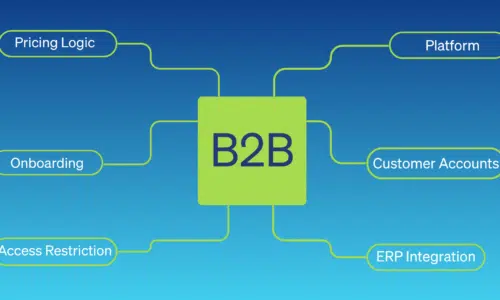

S hopify handles the buying side of B2B well. Catalogs, pricing, payment terms; it's all there.
What it doesn’t come with is a governance layer: a way to control who can buy, how much, under what conditions, and who approved it. Most merchants patch that gap with spreadsheets, email threads, and manual admin work. It holds together until it doesn’t and when it breaks, it usually breaks on an order that already shipped.
The company in this post is composite. It’s built from patterns we’ve seen across multiple Shopify B2B implementations the same recurring problems, the same workarounds, the same moment where a merchant realizes the buying side of their store works fine and the governance side doesn’t exist.
If you run a B2B operation on Shopify with more than a handful of accounts, you’ll probably recognize this business.
The Setup: Meet Acme Industrial Supply
Acme Industrial Supply sells safety equipment, consumables, and MRO products to facilities managers, purchasing departments, and operations teams across the U.S. They have 200 active B2B accounts. Most accounts have between 3 and 12 buyers. Some accounts have a single location. Their larger customers (regional distributors, national chains) have up to twenty ship-to addresses, each with its own purchasing team.
Acme has been on Shopify for two years. They’ve configured companies, locations, and catalogs. Pricing rules are in place. Payment terms work.
But governance? That lives in email.
Before: What “No Governance Layer” Actually Looks Like
Here’s what a typical week looked like for Acme’s operations team before B2B Company Controls.
A new buyer at an existing account emails in to request portal access. Someone on the ops team manually creates a customer record in Shopify, adds them to the right company, and replies with login instructions. This takes 15–30 minutes per request and happens 8–10 times a week.
A purchasing manager at a large account retires. Her replacement starts placing orders under her credentials for six weeks before anyone notices. By then, two orders have shipped to the wrong location.
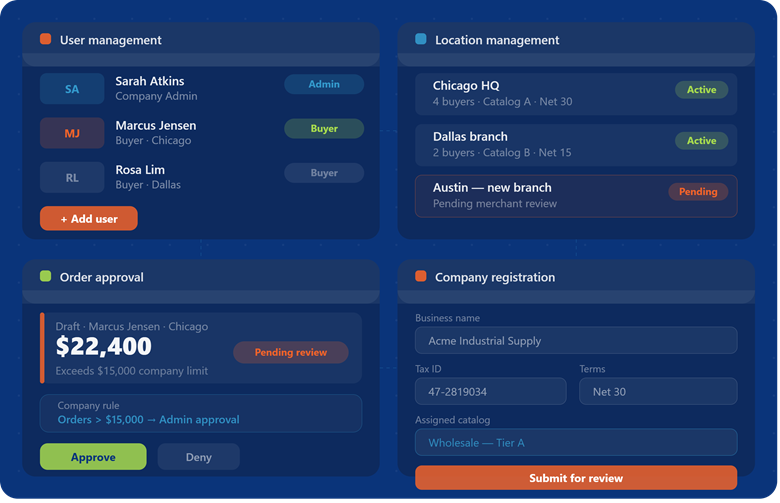
A buyer at a Chicago branch places a $22,000 order. It should have gone to a manager for approval, company policy says anything over $15,000 requires sign-off, but Shopify has no mechanism to enforce that. The order ships. The manager finds out from the invoice.
A buyer at an existing account is fired. The account must contact the ops team to remove the customer account from their assigned locations to restrict access. Their replacement is hired. The account must contact the ops team to add a new customer to their company and assign them to the appropriate locations.
None of these are catastrophic on their own. Together, they’re a part-time job. And they compound every account you add, making it worse.
The Setup: What Features Become Available Immediately
When Acme installs B2B Company Controls, here’s how we’d walk them through it.
Company Admin Role and User Management
The Company Admin Role allows merchants to delegate day-to-day account management to trusted customer contacts. Company Admins can manage users, assign roles, request new locations, and maintain account information without requiring merchant intervention for every change.
User Management provides Company Admins with the tools to add and remove users, control access, and assign responsibilities across their organization. This ensures that the right people have access to the right locations while reducing the administrative burden on merchant teams.
The result is a scalable self-service experience that keeps customer account data accurate, streamlines user administration, and reduces support requests related to account maintenance.
Location Management
Location Management gives companies the ability to maintain the information required to request new purchasing locations and keep existing locations up to date. Company Admins can submit new location requests, update location details, and manage the information needed to support their organization’s purchasing structure.
When a customer opens a new branch, acquires a business, or reorganizes operations, the Company Admin can provide the necessary details directly through the portal rather than relying on emails, spreadsheets, or support tickets. Once submitted, the merchant reviews the location request, validates information such as tax ID, assigned catalog, pricing, and payment terms, and then approves the location before it becomes active.
Acme enables Location Management for its customers as part of the onboarding process and encourages Company Admins to keep their location information current. This creates a more streamlined workflow while ensuring the merchant retains control over commercial and compliance-related decisions.
The immediate payoff: location requests become a structured, self-service process that reduces administrative back-and-forth while preserving merchant oversight and approval.
Purchasing Rules and Buyer Profiles + Order Approval Workflows
This is the one that addresses the $22,000 order problem. Draft Order Review adds a structured approval workflow before an order submits. Acme configures a rule: any order over $15,000 requires company admin approval before it can be finalized.
When a buyer places a qualifying order, it moves to pending review instead of submitting. The company admin gets a notification, reviews the draft, and approves or denies. The order only moves when the right person says it can.
Rules can be enforces at the buyer, location, and company level. Orders can be reviewed for approval at the location, company, or merchnat level.
Company Registration Form
Acme gets 15–20 new account inquiries per month. Currently, each one requires back-and-forth to verify the business, collect tax information, and set up the account. The Company Registration Form feature adds a self-serve intake form that captures what the ops team needs upfront. Applications come in structured. Approvals happen in the admin. New accounts get provisioned with the right settings from day one.
This doesn’t eliminate the review step. Acme still wants a human to approve new wholesale relationships. But it removes the email tag and the missing information requests that add two to three days to every onboarding.
What Actually Changes
A month in, here’s what Acme’s operations team notices.
New-user requests have dropped from the ops inbox. Company admins are handling their own accounts. The team is still available for edge cases (an admin who needs help, an account that needs restructuring), but the routine work is gone.
The ops team can pull up any account and see who has access, what rules are in place, and what orders are pending review. This sounds basic. Before, it wasn’t possible without cross-referencing Shopify admin data with a spreadsheet.
Post purchase order cancelation and returns are down because companies are ordering within the appropriate purchasing guardrails.
Customer satisfaction signals to watch in month one: a drop in “account access” support tickets, fewer emails asking about payment terms and location-specific pricing, and faster new-account onboarding measured from application submission to first order placed.
None of these are transformational on their own. But they’re the difference between an ops team that’s constantly catching up and one that’s actually running the business.
Get Started
If the Acme scenario sounds familiar (not identical, but familiar) B2B Company Controls is the layer your Shopify store is missing.
Install B2B Company Controls → [Streamline B2B Operations with B2B Company Controls | BlueBolt ]
Free 60-day free trial for everyone.