How Shopify Markets Simplifies International eCommerce

Aaron Shapiro

What Is Shopify Markets and How Does It Simplify International eCommerce?

Shopify Markets is Shopify’s native solution for managing international eCommerce from a single store. It allows merchants to localize pricing, currencies, domains, taxes, and content by region without creating multiple storefronts.

Shopify Markets simplifies global eCommerce by:

  • Eliminating the need for multiple stores
  • Centralizing operations in one Shopify admin
  • Localizing pricing, currency, and payment methods
  • Calculating duties and taxes at checkout
  • Supporting international SEO and domains

Why Shopify Markets Replaces Multi-Store Setups

Before Shopify Markets, international expansion required:

  • Separate Shopify stores per region
  • Duplicate product catalogs
  • Manual pricing updates
  • Fragmented analytics

Shopify Markets eliminates this model by allowing region-specific customization within a single backend.

Result: Lower operational overhead and faster global scaling.

Key Benefits of Shopify Markets for Global eCommerce

1. Localized Currencies and Payments

International conversion rates often drop at checkout due to unfamiliar currencies or limited payment options.

Shopify Markets automatically:

  • Detects customer location
  • Displays prices in local currency
  • Enables region-specific payment methods

For example:

  • China → Alipay
  • Netherlands → iDEAL
  • United States → Credit cards

Why it matters: Payment localization is a top driver of international conversion rate optimization.

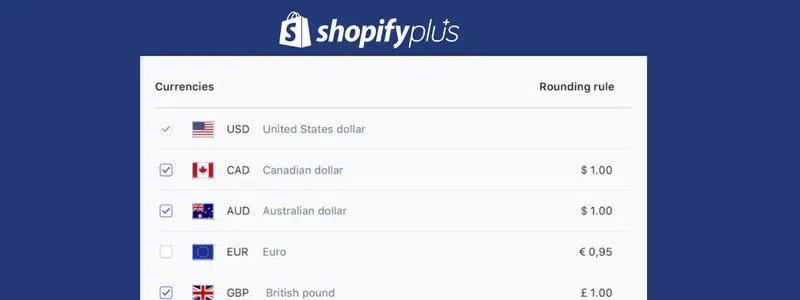
Shopify Markets: Currencies

2. Market-Specific Pricing and Catalogs

Different markets require different pricing strategies due to purchasing power, competition, and demand.

With Shopify Markets, you can:

  • Set regional pricing rules
  • Adjust margins by country or region
  • Customize product availability per market

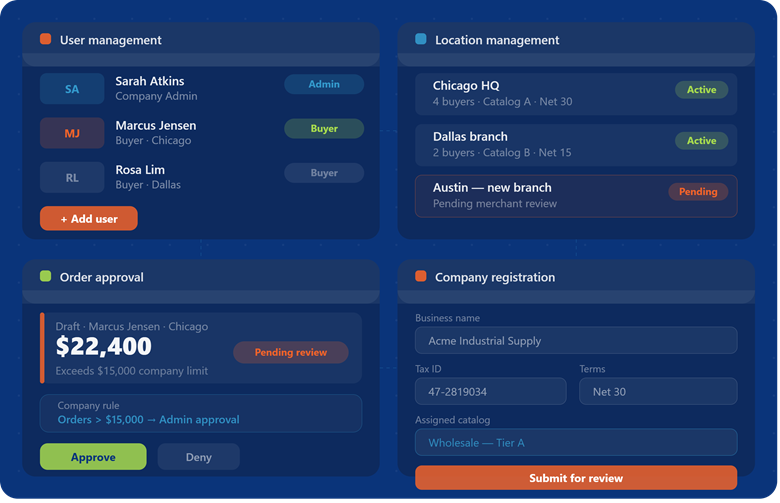
B2B advantage: Wholesale pricing and negotiated rates can be managed without creating duplicate stores; critical for scaling complex commerce operations.

3. Duties and Taxes

International selling used to mean endless confusion about duties and import taxes. Shoppers would abandon carts the moment they saw “taxes calculated at delivery” or got hit with surprise fees. Unexpected import fees are one of the top causes of cart abandonment in cross-border commerce.

Shopify Markets:

  • Calculates duties and import taxes upfront
  • Displays total landed cost at checkout
  • Eliminates surprise fees at delivery

Result: Increased trust, fewer abandoned carts, and reduced customer support issues.

4. SEO and Content Localization

To rank high in local search engines, you need localized content and SEO. Shopify Markets supports local domains, languages, and SEO. Ranking in international search results requires more than translation; it requires localization.

Shopify Markets supports:

  • Country-specific domains (e.g., .de, .co.uk)
  • Multi-language storefronts
  • Regionally optimized SEO signals

Example:
German customers see German-language content and localized SEO structure, improving visibility in regional search engines.

SEO Impact:
Localized SEO signals improve rankings in regional search engines and AI-generated answers.

5. Unified Operations in One Store

The biggest operational advantage is consolidation.

Instead of managing multiple stores, Shopify Markets allows you to:

  • Maintain a single inventory system
  • Centralize order management
  • View unified analytics and reporting
  • Manage customers in one database

Business impact:

  • Faster decision-making
  • Reduced operational complexity
  • Cleaner data
people shopping and world flags

Real-World Example of Shopify Markets in Action

Take a consumer electronics brand that managed four separate Shopify stores: one for the US, one for the UK, one for the EU, and one for Australia. Every product launch meant uploading products four times. Every price change required adjustments in four different backends. Reporting meant manually combining numbers from four separate dashboards.

This led to:

  • Duplicate product uploads
  • Manual price updates across stores
  • Fragmented reporting

After migrating to Shopify Markets:

  • All operations moved into a single store
  • Regional experiences remained fully localized
  • Reporting became centralized and accurate

Outcome: Reduced operational overhead and improved scalability.

Why Shopify Markets Matters for eCommerce Growth

Global eCommerce is rapidly expanding, but operational complexity often limits growth.

Shopify Markets removes key barriers by:

  • Eliminating the need for multiple storefronts
  • Delivering localized customer experiences
  • Simplifying backend operations

Bottom line:
Merchants can scale internationally without scaling complexity.

Shopify Markets vs Multiple Stores

FeatureShopify MarketsMultiple Stores
Store ManagementSingle adminMultiple backends
LocalizationBuilt-inManual
ReportingUnifiedFragmented
ScalabilityHighLimited
Operational CostLowerHigher

FAQ: Shopify Markets

What is Shopify Markets?

A built-in Shopify solution that enables merchants to manage international selling from a single store while delivering localized experiences.

Do I need multiple Shopify stores to sell internationally?

No. Shopify Markets eliminates the need for separate regional stores.

Can I control pricing by country?

Yes. You can set market-specific pricing and product availability.

Does Shopify Markets handle taxes and duties?

Yes. It calculates and displays duties and taxes at checkout.

Is Shopify Markets good for B2B?

Yes. It supports region-specific pricing and helps manage complex global buyer structures.

Key Takeaways

  • Shopify Markets = single-store global commerce infrastructure
  • Eliminates store duplication
  • Improves conversion rates through localization
  • Reduces operational complexity
  • Supports international SEO and discoverability

Final Takeaway

Shopify Markets transforms international eCommerce from a fragmented, high-maintenance model into a centralized, scalable system. For merchants, that means: lower operational costs, faster expansion into new markets, and better data and insights. For customers, it means a seamless, localized shopping experience anywhere in the world. As a certified Shopify Plus Partner, BlueBolt can help.

Built for Brands Managing Complex Global Commerce

Beyond Search: Is Your Store Ready for Agentic Commerce?

Chris Risner

T he fundamental rhythm of eCommerce has been the same for twenty years: a person searches, browses, clicks, and buys. But that rhythm is changing.

We’re at the beginning of a major architectural shift, moving from an era of human-driven search to one of AI-delegated action. This is the dawn of agentic commerce, and it represents a change as profound as the invention of the search engine itself.

For business leaders and technical teams, this isn’t a “wait and see” trend. With AI-driven traffic to retail sites surging 805% year-over-year, the platforms that are ready today will be the ones that lead tomorrow. The core question is no longer just about driving traffic; it’s about whether your infrastructure is built to speak the language of AI.

What is Agentic Commerce?

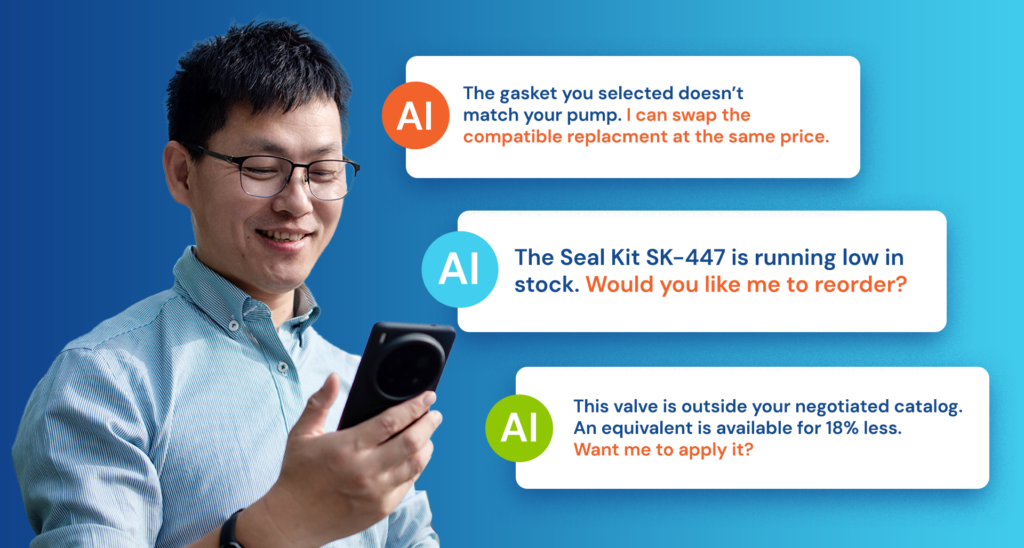
Person holding a cell phone

Agentic commerce describes transactions that are partially or fully handled by an autonomous AI agent acting on a consumer’s behalf. It’s the difference between a person searching for “best waterproof running shoes” and simply telling their AI assistant, “Find and buy the best-rated, waterproof trail running shoes in my size for under $150, and get them here by Friday.”

In this scenario, the AI agent performs the discovery, comparison, verification, and purchase. It interacts directly with a store’s data, not its visual interface. This transition from “searching” to “doing” is already underway, and its momentum is building fast.

  • Market Projections: McKinsey forecasts that agentic commerce will drive $5 trillion in global volume by 2030.
  • Traffic Transformation: Adobe has already tracked an 805% increase in AI-driven traffic to retail sites.

This is a clear signal that a new, high-volume channel is opening up. However, access to this channel depends entirely on your store’s technical readiness.

Agents need structured, machine-readable data to understand product attributes like size, material, and compatibility.

The Visibility Gap: Why Legacy Systems Are Invisible to AI

AI agents don’t browse. They don’t get swayed by beautiful design or clever marketing copy. They parse data. They query APIs. Their decision-making is ruthlessly efficient, and if your platform can’t answer their questions in milliseconds, you are functionally invisible.

This creates a “visibility gap” for many businesses running on traditional or monolithic platforms. These systems often fail at two critical tasks:

  1. Providing Real-Time Data: An AI agent must verify product availability instantly. If your inventory data is updated on a delay, the agent can’t trust it. It will move on to a competitor whose system can provide immediate confirmation.
  2. Structuring Product Information: Agents need structured, machine-readable data to understand product attributes like size, material, and compatibility. Without proper schema markup, an agent has to guess, and AI agents are programmed to avoid ambiguity. They will simply ignore products with messy or incomplete data.

In the age of agentic commerce, poor data quality isn’t just a backend headache—it’s a direct barrier to revenue.

Shopify’s Open Ecosystem vs. The Walled Garden

As this new landscape takes shape, two competing philosophies are emerging.

On one side are the “walled gardens” like Amazon and Walmart. These giants are integrating agentic AI to keep customers within their closed ecosystems. While effective for them, this strategy turns third-party brands into commodities and keeps valuable customer data away from the merchants themselves. The AI serves the marketplace, not your business.

On the other side is Shopify’s open ecosystem model. Instead of building higher walls, Shopify is helping build the universal standards for the future of retail. Through the co-developed Universal Commerce Protocol (UCP) with Google, Shopify is standardizing the language of agentic shopping.

This approach gives merchants a powerful advantage. It ensures your product catalog is a structured, validated data feed ready for AI assistants like Google Gemini. By choosing an open standard, you make your products discoverable by any agent, on any platform that adopts the protocol. You retain control over your brand, your data, and your customer relationships.

The Technical Foundation for an AI-Driven Future

Preparing for agentic commerce isn’t about adding a chatbot. It’s about ensuring your core infrastructure is built for data-first interactions. Shopify’s platform, especially its Agentic Plan, is engineered to provide these foundational capabilities.

  • Real-Time Inventory Sync: Shopify’s APIs are built for high-velocity synchronization, giving agents the instant stock validation they require to complete a purchase confidently.
  • Complex Cart Building: Agents fulfill complex goals, not just single-item purchases. Shopify’s architecture supports multi-item, cross-category cart building via API, handling requests that would cause friction on legacy platforms.
  • Structured Data Readiness: Through its support for UCP, Shopify helps ensure your product data is structured correctly, allowing AI agents to understand your catalog with near-zero error.

Future-Proof Your Business Today

The shift to agentic commerce is happening now. The businesses that will thrive are those that invest in the right data infrastructure today. Waiting to see what competitors do means you’ll already be behind.

The first step is to assess your current capabilities. Can your platform provide real-time inventory data? Is your product information structured and machine-readable? For many retailers, the honest answer is no.

Shopify provides a direct path to agentic readiness. We believe in replatforming for strategic advantage, and this is a moment of profound strategic importance.

Ready to see how your infrastructure stacks up?

Shopify Magic and Sidekick: Are These AI Tools the Future of eCommerce or Just Flashy Assistants?

Aaron Shapiro

A I is the new intern, strategist, and copywriter rolled into one and Shopify isn’t sitting this one out.

Enter Shopify Magic and Sidekick, the platform’s dynamic AI duo designed to simplify merchant life and boost productivity with a sprinkle of wizardry (and a whole lot of algorithms).

But how magical are they, really? And how do they stack up against other AI tools currently shaking up eCommerce? Let’s dig in.

What Is Shopify Magic?

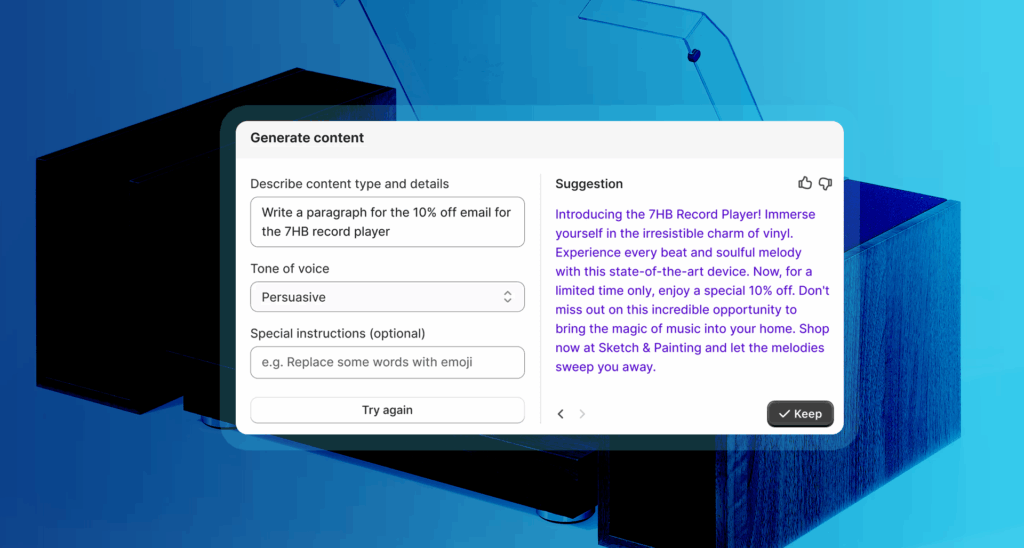
Shopify Magic is Shopify’s built-in generative AI feature. It works behind the scenes to automate everything from product descriptions to marketing emails and customer replies. Think ChatGPT, but tailored to the daily grind of an eCommerce business.

Pros of Shopify Magic:

  • Context-aware: Pulls info from your store’s product titles, categories, and past content to auto-generate high-quality copy.
  • Multilingual capabilities: Great for global brands—generate content in multiple languages with ease.
  • Integrated workflow: No copying/pasting between tools. It’s embedded right into the Shopify admin.

Cons of Shopify Magic:

  • Limited customization: Unlike standalone AI tools, there are fewer prompts or advanced settings.
  • Generic tone: The output can feel a little bland if you don’t manually refine the copy.
  • Still evolving: It’s suitable for day-to-day help, but doesn’t replace a brand strategist or creative writer just yet.

What Is Shopify Sidekick?

Shopify Sidekick is like Clippy got a glow-up, drank a Red Bull, and earned an MBA in commerce. It’s a conversational assistant (powered by large language models like ChatGPT) that helps merchants manage their stores with natural language commands.

Want to “launch a summer sale on all sunglasses”? Type it in, and Sidekick gets to work.

Pros of Sidekick:

  • Conversational interface: No need to know where settings live—ask.
  • Time-saving: Automates tasks like report generation, inventory edits, or theme tweaks.
  • Smart suggestions: Offers proactive tips based on your store’s performance.

Cons of Sidekick:

  • Beta limitations: Not all features are currently available; rollouts have been implemented gradually.
  • One-size-fits-all UX: May struggle with complex custom store setups or unique business logic.
  • Dependence on Shopify data: Doesn’t integrate well with external tools (yet).

Shopify Magic vs. the Rest of the AI Realm

So how do Shopify’s AI tools stack up against the trendsetters in the AI space?

  • ChatGPT + Zapier is great for power users and automation lovers.
  • Content Agents shines for generating lots of marketing copy but lacks Shopify integration.
  • Notion AI is your brainstorming buddy but doesn’t speak “commerce.”
  • Shopify Magic & Sidekick win on convenience and seamless Shopify workflow integration.
FeatureShopify Magic & SidekickChatGPT + ZapierContent AgentsNotion AI
Built for EcommerceYesNot native (but customizable)YesNo
Workflow IntegrationNative to ShopifyWith setupBasic eCommerce useNo: Mainly content
Ease of UseBeginner-friendlyNeeds tinkeringYesYes
CustomizationBasic prompt editingFull controlTemplates onlyContextual editing
Real-Time Store ManagementSidekickNoNoNo
AI content generator

Shopify Magic and Sidekick aren’t just AI add-ons; they’re a glimpse of Shopify’s vision: an eCommerce backend where merchants spend less time managing and more time creating and scaling.

Are they perfect? Not yet. But they’re improving fast and offer a low-effort, high-impact way to leverage AI directly within your store. For store owners who don’t want to become prompt engineers or Zapier wizards, this could be the real magic.

Forward-thinking tip: The future of eCommerce AI lies in hyper-personalized, action-oriented assistants. Watch for Shopify to expand Sidekick’s skills into marketing, analytics, and maybe even a full-blown virtual operations manager. The AI arms race in eCommerce has only just begun. 

SEO Has Grown Up. Has Your Strategy?

Search engine optimization isn’t what it used to be, and honestly, that’s a good thing. Gone are the days of stuffing keywords into thin content like it’s a piñata of search traffic. Google’s algorithms have matured (glow-up alert), and now they’re rewarding brands that do the same.

Enter Google’s Helpful Content Update.
Spoiler: It’s all about real value. That means informative, well-structured content that speaks to human beings, not just crawlers. If your site’s still leaning on fluff and filler, it’s time to rethink the game plan.

Page Experience Signals are front and center.
Mobile responsiveness, fast load times, intuitive navigation these aren’t just “nice to haves” anymore. They’re ranking factors. A clunky site? That’s SEO sabotage.

E-E-A-T: Experience, Expertise, Authoritativeness, Trustworthiness.
Especially for service-based industries, Google is sizing up how credible your content (and your brand) really is. Think: expert blogs, testimonials, case studies, the kind of stuff that says “we’ve got receipts.”

And about that AI-generated content…
Yes, it can help you scale. But the bots can’t fake authenticity. Google’s watching closely, and so are your users. You still need a strong editorial voice, clear value, and content that sounds like it came from a real person (preferably a smart and helpful one).

SEO is now less about tricking the algorithm and more about treating your visitors like actual people. Who knew? If your SEO strategy feels like it’s stuck in 2015, now’s the time to evolve. Because in 2025, only the most helpful, human, and high-performing content will survive.

Want to Know More?

AI + Shopify: How Smart Merchants Are Winning Big in 2025

Aaron Shapiro

O nce upon a time, launching a Shopify store meant uploading some products, crossing your fingers, and hoping customers showed up.

Fast forward to 2025, and that fairytale is long gone. Today’s merchants are embracing artificial intelligence (AI) not just to survive—but to thrive.

From creating personalized shopping experiences to running operations on autopilot, AI is the ultimate Shopify sidekick. Let’s take a walk down this digital runway and explore how AI is revolutionizing the way merchants do business—and why, frankly, if you’re not using it, you’re falling behind.

The Age of Customer Insights: AI as Your Data Whisperer

Picture this: a customer walks into your virtual store. They click, scroll, pause. That behavior? It’s a goldmine of insight. But without AI, you’re essentially panning for gold blindfolded.

AI agents analyze mountains of customer data in milliseconds, pulling out patterns you wouldn’t spot in a lifetime. They track:

  • Browsing habits
  • Purchase history
  • Abandoned carts
  • Even micro-signals like hover time on a product image

This isn’t about creeping on your customers (let’s leave the spy work to the movies). It’s about serving up exactly what they want. Personalization powered by AI is no longer a nice-to-have. It’s expected.

And the payoff? According to McKinsey, companies that ace AI-driven personalization see revenues jump by 5 to 15 percent, all while trimming marketing costs by as much as 30 percent. That’s not pocket change—that’s game-changing [McKinsey].

Operations on Autopilot: AI, the Manager You Never Knew You Needed

Remember the good old days of manually tracking inventory with spreadsheets? Neither do we, and we’re all better for it.

AI on Shopify is the operations manager who never takes a coffee break. It keeps your stock levels optimized, pricing competitive, and fulfillment smooth. Here’s how:

  • Inventory automation: AI predicts demand spikes and keeps you ahead of stockouts.
  • Dynamic pricing: Prices adjust in real time based on competitor moves, customer demand, or even the weather (because yes, people do buy more boots when it rains).
  • Smart fulfillment: AI flags bottlenecks in your supply chain before they derail delivery timelines.

And it works. Gartner reports that companies using AI in supply chain operations see stockouts reduced by 25 percent and inventory turnover improved by 30 percent [Gartner]. That’s the kind of efficiency that turns headaches into high-fives.

AI Chatbots: Because Nobody Likes Waiting on Hold

Picture this: it’s 11:47 PM, your customer wants to know where their order is, and your human support team is, understandably, asleep. Enter AI chatbots—your store’s tireless, endlessly patient front line.

AI chatbots on Shopify can:

  • Handle hundreds of inquiries simultaneously (no hold music required)
  • Provide real-time order tracking, returns info, and sizing guidance
  • Offer personalized product suggestions based on browsing history

And they’re not just good at saving time—they’re good at saving sales. Salesforce reports that AI-powered bots reduce cart abandonment by up to 20 percent. Even better, 62 percent of consumers actually prefer using self-service tools for simple tasks [Salesforce].

The secret sauce? These bots don’t just parrot FAQs. They engage customers in ways that feel tailored, relevant, and dare we say… helpful.

Upselling and Cross-Selling: The Art of the Friendly Nudge

Let’s face it—we’ve all been on the receiving end of a bad upsell. But AI makes upselling (and cross-selling) feel less like a pushy sales pitch and more like a well-timed suggestion from a stylish friend.

Shopify’s AI apps analyze customer behavior to:

  • Identify the perfect moment for a premium upgrade
  • Suggest complementary items at checkout (that hat does look great with that jacket)
  • Bundle products in a way that feels natural, not forced

The result? Forrester found that personalized upsell and cross-sell strategies can boost average order values by 10 to 30 percent [Forrester]. That’s revenue that adds up—without annoying your customers.

Where It’s All Headed: The Future of AI on Shopify

Think AI on Shopify is impressive now? We’re just getting started. The next wave promises experiences so immersive, shoppers may never want to leave your store. Here’s what’s on the horizon:

  • AR + AI product configurators: Shoppers will be able to visualize furniture in their living room or see how that watch looks on their wrist before clicking buy.
  • Voice commerce: AI shopping assistants will guide customers through purchases using natural language—no typing required.
  • Predictive customization: Your store will anticipate customer preferences down to the last detail, from color to fit to feature set.

McKinsey puts it bluntly: 71 percent of consumers now expect brands to deliver personalized interactions, and 76 percent get frustrated when they don’t [McKinsey]. The message is clear: AI isn’t optional. It’s essential.

woman shopping - uses a screen to check her clothes

Why All This Matters (and What You Should Do About It)

Here’s the bottom line: AI lets Shopify merchants punch above their weight. Whether you’re a solo entrepreneur or a scaling brand, AI helps you:

  • Serve customers better
  • Run operations smarter
  • Sell more (without feeling like you’re selling)

And it doesn’t require a computer science degree to get started. Shopify’s ecosystem is packed with AI apps and integrations designed for merchants, not engineers.

So, what’s your move? If you’re not using AI, now’s the time to start experimenting. Begin with chatbots or product recommendations. Test dynamic pricing. Dip your toe into predictive analytics. The tools are there—and so is the opportunity.

Ready to Future-Proof Your Shopify Store?

AI is changing eCommerce faster than you can say “machine learning.” The question isn’t if you’ll use AI. It’s how soon you’ll let it help your store work smarter, not harder.

Need help figuring out the right AI tools for your business? Want guidance on setting up AI-powered apps in Shopify? Get in touch.

Shopify + AI

Unlock Seamless Ecommerce with Shopify and Optimizely

Jayme Rey

A re you a Shopify customer looking for a way to enhance your online store's functionality with a world-class content management system? BlueBolt and Optimizely offer an ideal solution.

By combining Shopify’s powerful ecommerce capabilities with Optimizely’s best-in-class CMS, BlueBolt has built a seamless, integrated experience that optimizes both sales performance and customer engagement.

Why This Integration Matters

This integration bridges the gap between content management and ecommerce, allowing businesses to boost sales by providing a better, more cohesive customer experience. By uniting Shopify’s robust product catalog management with Optimizely’s flexible content tools, marketing and ecommerce operations run smoother than ever. Here’s how:

1. Optimizely Experimentation for Continuous Improvement

Want to test new features or layouts? With Optimizely Experimentation, you can easily A/B test different experiences on your site, helping you refine your store to maximize conversions. Every new feature or page can be tested and optimized based on real-time customer feedback, ensuring your site evolves with the needs of your audience.

2. Drag-and-Drop Simplicity for Content Editors

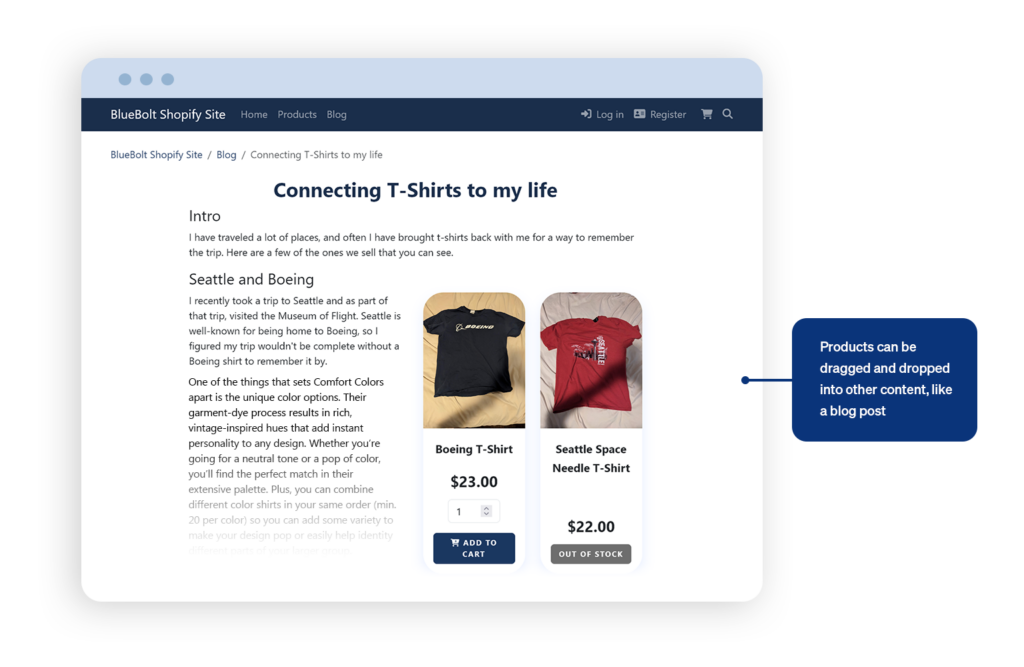
One of the most powerful aspects of this integration is the ease with which content editors can work. Products in Shopify are treated as content within Optimizely, allowing editors to simply drag and drop product images or descriptions into pages or blog posts. No need for cumbersome linking—customers can purchase directly from the content they’re interacting with, be it a blog post or a product guide.

Unlock Seamless Ecommerce with Shopify and Optimizely
3. Unified Content and Product Catalog Management

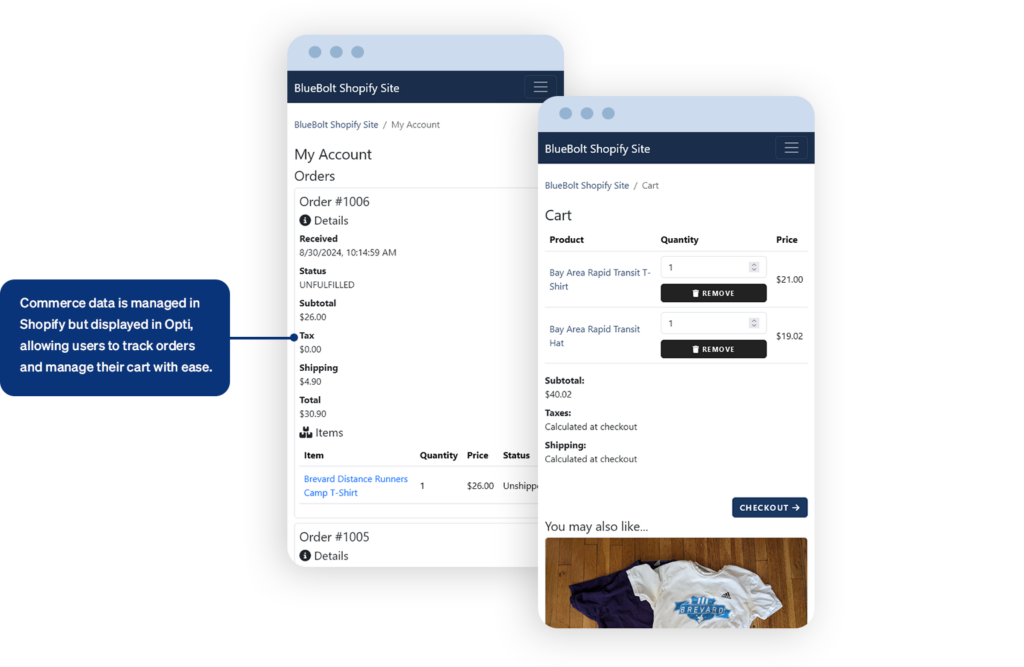
With this solution, you manage your product catalog in Shopify while Optimizely handles your site’s frontend and marketing content. Whether you’re updating images, product descriptions, blog posts, or other marketing content, changes are synchronized in real-time. This means faster updates and a consistent experience for your customers, no matter where they interact with your products.

Unlock Seamless Ecommerce with Shopify and Optimizely

4. Industry-Leading Search Powered by Algolia

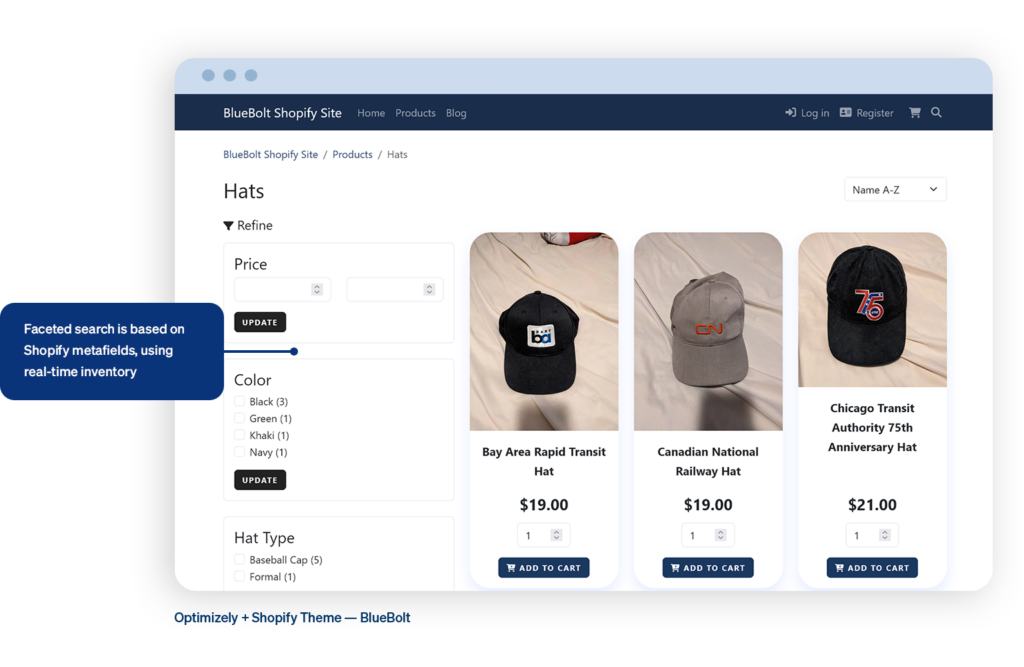
Customers will never have to struggle to find the products they need. The integration includes Algolia-driven search functionality, offering faceted search options based on Shopify metafields, including real-time inventory data. This ensures that customers get accurate, up-to-date product results that help them make purchasing decisions faster.

Unlock Seamless Ecommerce with Shopify and Optimizely
5. AI-Driven Marketing Tools

Marketers benefit from AI-powered tools that can automatically generate marketing copy, speeding up the process of getting new products online and ready for sale. Whether you’re launching a new product or running a seasonal promotion, the integration ensures that your marketing efforts are in sync with your catalog updates.

A Seamless Shopping Experience

For customers, the integration provides a smooth, cohesive experience. Even though product data is managed in Shopify, everything is presented beautifully on the front end through Optimizely. This means users can easily add items to their cart, manage their orders, and browse products, all without interruptions or inconsistencies in their shopping journey.

Unlock Seamless Ecommerce with Shopify and Optimizely

With Shopify’s ecommerce power and Optimizely’s intuitive CMS capabilities, you can take your ecommerce site to the next level—offering not just products but a fully integrated, engaging customer experience.

Ready to supercharge your Shopify store with Optimizely’s CMS? This powerful integration gives you a seamless way to manage both content and ecommerce in one place—driving faster growth and delivering a standout experience that will wow your customers.

How to Implement an Omnichannel Strategy with Shopify

Honey Olesen

O ver the last decade, retail has progressed significantly, and customers now demand an integrated online shopping experience. Consumers today no longer have to be tethered to a single device or place when they engage with brands — browsing products on their phone, exploring an in-store display, and socially engaging.

An omnichannel strategy is ideal and necessary for businesses attempting to remain competitive in this increasingly complex environment. Shopify, known for its robust eCommerce platform, offers the perfect ecosystem to create and manage an omnichannel experience.

What is Omnichannel Strategy

But first, let’s establish what constitutes an omnichannel strategy.

Omnichannel strategy: This means providing a seamless customer experience across all touchpoints—online, on social media, or in your brick-and-mortar store. Set a standard that your customers should feel the same grade of service or brand awareness when they shop through the website, on Facebook, or at your local shop.

It is also common to mistake Omnichannel for multichain; however, they are different from each other. A multichannel strategy involves selling through multiple channels, but those channels may not be connected. For example, your online store may have different inventory or prices than your physical store. Conversely, an omnichannel strategy means that all sales and customer touchpoints are linked, making the experience transparent.

Know your customer journey

So, even before you use Shopify’s numerous tools to help attract customers, map out your customer journey across many channels. To employ an efficient omnichannel strategy with Shopify, you should understand how your customers interact with your brand across multiple channels. The customer journey is business-specific and varies depending on your vertical / target market and sales channels.

Once you learn how your customers interact through the sales funnel, it becomes easier to create an integrated experience across all channels. For instance, if you learn that your customers usually find out about your brand via social media but favor purchasing in-store over online shopping, make sure to focus on both channels and align them together.

Put Shopify POS to Use for Blended In-Store and Online

For those of you with a brick & mortar, Shopify has an incredibly robust Point of Sale (POS) system. It brings your online and offline operations together. This includes sync of inventory, sales, and customer data, allowing services like “buy online pick up in-store” or “browse in-store ship to home.” From your customer’s perspective, it is all one brand experience regardless of the channel.

Key Benefits of Shopify POS:

Inventory Management: Shopify POS keeps inventory always up-to-date, regardless of whether a customer buys an item online or in-store. With this feature in place, you should never oversell, and customers can see the real-time availability of products.

In-store Customer Profiles with Purchase History: Shopify POS allows staff to easily access detailed customer profiles, including purchasing history and preferences. This allows tailored suggestions so that shoppers obtain exactly what they are looking for while feeling special both online and in-store.

More Fulfillment Options: Branch out into “buy online, pick up in-store” (BOPIS), ‘ship from store’ or ‘reserve in-store,’ etc., with Shopify POS features that all sync seamlessly. One of the reasons this resonates with customers is that having more and owning it gives them the power to, for instance, research products online before they trot out to a physical store to pay up.

Unify Your Sales Channels

With Shopify, you can sell on multiple online channels, such as your website, Facebook, and Instagram Shops. You can also control inventory, pricing, and orders for all these platforms from one place through the Shopify dashboard. This provides a seamless experience so your customers can view the same product details, prices, and promotions from anywhere in the world or on any channel!

Beyond social media, Shopify allows you to integrate with major online marketplaces like Amazon, eBay, and Walmart. These platforms have millions of active users; tapping into these audiences can significantly boost sales.

How to Implement an Omnichannel Strategy with Shopify

Utilizing Shopify Flow for Automation

Omnichannel operations are complex. Shopify Flow is an event-based feature that lets you create automated workflows. These automations help eliminate manual work, reduce errors, and free up time to focus on higher-level tasks like marketing and strategy.

For example, you can set up workflows to:

  • Automatically notify staff when inventory falls below a certain threshold.
  • Tag and segment customers based on their buying behavior (e.g., first-time buyers, repeat customers).
  • Trigger personalized email campaigns when customers abandon their cart or complete a purchase.

Automation ensures that every part of your omnichannel strategy is working together. Whether it’s updating stock levels across platforms or sending personalized communications based on customer behavior, Shopify Flow keeps your channels synchronized without manual intervention.

Concentrate on Branding and Messaging Consistency

It is crucial to keep your branding consistent at every touchpoint — from when the customer receives an email, reads a social post or goes on your website. Shopify integrates with key marketing automation tools like Klaviyo, Mailchimp, and HubSpot to create consistent branding via email & SMS campaigns in harmony.

You reinforce brand trust and recognition by maintaining the same voice, tone, and design elements across channels. Even small things, like matching your website’s color palette with your Instagram feed, make a difference.

Optimize for Mobile

Shopping on mobile is no longer a trend. Over the last year, it’s estimated that 56% of all online sales came from a mobile device—a number that has increased yearly since smartphones were invented. Your Shopify store needs to be well-optimized for mobile shopping so you can provide a consistent omnichannel experience.

Not all mobile shopping ends when customers leave your store. You can send push notifications or use SMS marketing to reach a customer directly on their phone. With an app like Shopify Ping, you can chat with customers in real-time using Facebook Messenger or Apple Business Chat and deliver personalized support wherever they are. Provide payment and fulfillment choices.

Offer Flexible Payment and Fulfillment Options

Omnichannel strategies are all about flexibility. Shopify can connect to more than 100 payment gateways—from credit cards like Visa and Mastercard to digital wallets like Apple Pay, Google Pay, or Amazon Pay. Cryptocurrency payments can even be configured if desired. Shopify also integrates with “buy now, pay later” solutions via Klarna, Afterpay, and Affirm.

Providing the customer with multiple payment options will enhance their buying experience and lower friction at checkout. For example, if a customer is paying in installments, they might be more likely to complete their purchase if that option is offered.

How to Implement an Omnichannel Strategy with Shopify

Analyze and Iterate

Finally, the key to a successful omnichannel strategy is constant optimization. With built-in analytics, including integration with Google Analytics and Facebook Insights, you can clearly understand your customer behavior on the Shopify website.

Use Shopify’s built-in reports to track key metrics like:

  • Sales by Channel: Identify which sales channels are performing best, whether it’s your online store, social media, or in-store sales.
  • Customer Behavior: Monitor how customers move through your sales funnel and identify areas for improvement.
  • Inventory Management: Track stock levels across channels to ensure you’re never over- or under-stocked.

Conclusion

An omnichannel strategy can help you unify the experience and make it hassle-free for your customers. Thanks to Shopify’s full suite of tools – from POS systems to Shopify Flow — setting a strategy like this in motion is easier than ever. Your goal should be to provide a seamless touchpoint where you remain focused on the customer journey and integrate your sales channels, testing that all of these paths can consistently offer an experience for those interacting at any point throughout this story arc.

This will not only build customer loyalty but also help you stay ahead of the competition and align your business with how the vast majority of customers shop today.

Get Shopify Help Today

BlueBolt Solutions Celebrates the Shopify Summer 24 Editions

Honey Olesen

S hopify Summer Editions 2024 (Unified) was released June 2024 with new features and capabilities to optimize operations, increase sales, and provide excellent customer care.

Empowering E-commerce Excellence

Get ready to dive into the exciting world of Shopify Summer Editions 2024! Let’s explore the standout features that make this release a game-changer for online sellers.

Expand With Markets

Shopify Markets has undergone a significant upgrade, allowing merchants to seamlessly manage cross-border, retail, and B2B expansion all within the Shopify admin. This update opens the door to unlimited growth opportunities.

Additionally, Markets now offer the ability to create highly personalized buyer experiences for each market from a single store, eliminating the complexities of managing separate stores and data synchronization.

Furthermore, Shopify Plus merchants can expand their B2B operations more easily by customizing store themes for each B2B market, efficiently catering to different regions.

Introducing Shopify Magic

With features like Sidekick, an AI-powered virtual assistant, or advanced image-creating programs, Shopify Magic uses advanced technology to make running a business easier.

Create professional product photos with the Shopify AI-enabled image editing tool. Using Shopify Magic, build SEO-friendly product descriptions. Easily classify products with AI-suggested categories, attributes, and values to make them more discoverable in storefronts and marketplaces.

Style Settings

Style Settings allows merchants to customize storefront layouts to match their brand’s evolving look. Merchants can now easily adjust layout, size, and spacing across different devices, including mobile. Additionally, introducing Flex Sections allows for easy drag-and-drop customization of theme components, empowering merchants to achieve their desired storefront aesthetics without needing extensive coding knowledge.

Shopify Styles Image

Split Shipping 

Not yet released, split shipping in checkout will give customers more clarity and choice by showing them when an order will be split into multiple shipments. This feature allows customers to choose different shipping methods for various items within the same order, depending on their needs. For instance, customers can opt for faster delivery of urgent items while selecting standard shipping for less urgent goods.

Rebuilt Analytics

Shopify rebuilt its analytics tech stack to make it faster, more flexible, and more intuitive. This upgrade allows merchants to view, explore, and manage their data in real-time, aiding in more informed decision-making.

Merchants can customize their dashboards, creating dynamic data tables like Excel pivot tables. Don’t have time to make a custom report? Shopify provides drag-and-drop pre-made reports that merchants can resize according to their needs. Furthermore, merchants can soon use ShopifyQL to query data inside a report.

BlueBolt Solutions: Your Go-To for Online Success

At BlueBolt Solutions, we’re committed to keeping our clients at the forefront of online shopping. The Shopify Summer 24 Editions present a significant opportunity for our clients to elevate their businesses and provide their customers with the best shopping experience. With over 150 new updates designed to make the platform faster, stronger, and more connected, our team is here to guide you in seamlessly integrating these new features and maximizing these incredible upgrades. You can count on us as your trusted partner for this exciting journey.

Reach out to us for expert advice and strategic planning as you navigate through the latest updates on Shopify. Let’s work together to transform your online business into a hub of innovation, growth, and unparalleled achievement! We can’t wait to embark on this journey with you.

For more information on the Shopify Summer 24 Editions, visit the official Shopify Editions page.

Interested in our Shopify services?

Noteworthy Shopify Updates in Shopify’s Winter Edition 2023

Chuck Goldsworthy

S hopify recently rolled out their Winter Editions 2023, which features100+ new product updates and announcements. As a Shopify Plus Partner, our team can’t wait to test out these new features and functionalities.

Most of all, our team is very excited for the new flexibility and customization Shopify is enabling on their platform – and how this will enable us to deliver better solutions for our clients. Below are the standouts from Shopify’s Winter Edition 2023 that are worth calling out. Since there are a lot of great updates, we categorized them into updates for developers, B2B merchants, marketers and social media marketers. Hope you find these helpful! If you have questions on how to implement these in your project, please reach out to us.

Shopify Winter Edition News Developers Will Love

Shopify Functions

In the latest Winter Edition 2023, Shopify delivered Shopify Functions, a feature that puts the power of the Shopify platform in the hands of the Shopify community. At BlueBolt, we know the new Shopify Functions will be a game changer for merchants. Shopify Functions opens up Shopify’s backend logic, giving merchants ultimate control over their website. Shopify Functions allows brands to extend and customize Shopify features to meet their unique business needs. With this new feature, developers will now be able to these customizations and have them execute in under 5ms. This enables brands to autoscale for the largest of marketing campaigns and promotions, ensuring you don’t miss sales during Q4 and other special events.

One Page Checkout

Shopify’s checkout leads the ecommerce industry in security, reliability, and performance standards. However, conversion rates have lagged due to the multi-step check out process, giving shoppers opportunities to abandon their orders. For years, merchants have relied on custom development work or third-party apps to work around these limitations to help increase their conversion rates. With Winter Editions 2023, Shopify announced a one-step checkout is now standard across all Shopify storefronts, with built-in checkout extension functionality. Brands are now able to update the look and feel of their checkout with the Branding API, add upsells, cross-selling opportunities, and dynamic discounts within a singular view. This welcomed update enables customers to complete their checkout, without leaving the buying experience. Additionally, the One Page Checkout feature is locked down for security and speed optimization, which will be appreciated by merchants and their shoppers alike.

Drag-and-Drop Checkout Editor

One neat feature of Winter Editions 2023 is Shopify’s new drag and drop checkout editor, which makes it easier for developers and merchants to customize and integrate Shop Pay seamlessly. The new drag and drop editor can be found in the “Checkout and Accounts” tab of the Shopify store dashboard, where merchants can customize the checkout page easily. The new editor allows brands to change the checkout interface design, such as the logo, text colors, text fonts, and more, giving merchants control of their Storefront presentation. Additionally, if merchants want to design a more unique checkout page, they can use the Checkout Branding API and API Client tool. Additionally, companies can now also install external applications to add features that can increase the conversion rate on the checkout page, enabling cross-sell setup and automatic discount setup. The new checkout is fully responsive, ensuring an optimal experience on any device, including cell phones.

Product Bundles

Shopify agency partners have long been asking for product bundles, so this is exciting news for developers! Creating native product bundles celebrates the platform’s ability to accept product variability and complexity. This allows merchants to create new combinations of SKU offerings and new product experiences, which ultimately helps increase Average Order Value (AOV). Bundling is still in beta mode and invite-only for now. However, it is expected to be widely released in the coming months.

Granular Permissions

To help make managing a business and team easier for merchants, Shopify announced new granular staff permissions that help delegate more product related tasks with confidence. There are ten new granular permissions for products, including view-only permissions, so merchants can have better control over staff access across to products. These new permissions include view products, view cost, create and edit products, edit cost, edit price, manage inventory, delete products and collections, view catalogs (price list), create and edit catalogs and delete catalogs. These new permissions give merchants the ability to delegate with confidence.

Need Help with Shopify Plus?

Exciting Shopify Winter Edition Updates for B2B Merchants

‍B2B APIs

A customizable B2B sales channel has long been an acknowledged weak spot with the Shopify platform. With Shopify’s new B2B APIs, brands can now create customizable rules and functions for the most complicated of wholesale businesses. These B2B API’s enable marketers to set up custom pricing tiers, delivery notes, net payment terms, loyalty programming for select customers, and much more. BlueBolt is excited to bring this new functionality to our B2B clients.

B2B Vaulting Payments

Shopify just launched B2B Vaulting Payment, which enables B2B buyers to vault credit cards and reuse them for purchases at checkout, for both pay now and with payment terms. This feature provides B2B buyers the flexibility to seamlessly pay for orders at checkout or to be charged at a future date when their payment is due, without manually re-entering their credit card information. This happens all while providing the merchant peace of mind and ability to more efficiently complete payments on orders without buyer interaction.

Additionally, both B2B buyers and B2B merchants have full visibility and control over their vaulted credit cards. This process allows for credit cards to be stored at the company location level so that any B2B buyer for that location has the ability to manage their vaulted cards on their customer account. This means B2B buyers can view and delete any of their vaulted credit cards at anytime.

Merchants can also view and delete vaulted credit cards including the ability to charge buyer’s vaulted credit cards through the admin controls. Additionally, merchants will be able to push notifications for B2B buyers to update their vaulted credit card information via their account.

Quantity Rules

With their commitment to offer B2B ecommerce as an integral part of their platform, Shopify continues to expand their B2B product offerings. Since the platform started to support B2B business 6 months ago, Shopify has released diverse features and support. Quantity rules are one of the new features in this Shopify Winters Edition. This enables merchants to create order quantity rules, including minimums, maximums, case packs, and increments. These quantity rules will increase the Average Order Value and simplify the fulfillment process, which is a welcome addition for B2B merchants.

Checkout to Draft for B2B

Traditionally, B2B commerce orders are very nuanced and complex, needing multiple checks in the ordering process to ensure the right custom product is delivered. With Shopify’s new Checkout to Draft feature, B2B merchants can streamline the order process for their customers by using the Checkout to Draft. Customers can place draft orders and submit them to a merchant, so the orders will not be processed until both parties confirm the details. In this feature, merchants can also change the order content in case they lack inventory. Since orders from a business can be large in volume and amount, being able to manage risks within Shopify is very convenient for B2B merchants.

Marketing Teams Will Appreciate these Shopify Winter Edition Additions

Shop Promise

Another one of the most exciting announcements for marketers in Shopify’s Winter Edition has to be Shop Promise. Shopify has announced that it is going to compete head-to-head with Amazon by guaranteeing two-day delivery. It’s bundled as a sales channel within Shopify’s fulfillment network and available within the Shop app. It’s too soon to say whether or not this will move the needle for merchants’ conversion rates and increase Net Promoter Scores (NPS scores) for brands. However, Shop Promise appears to be a promising new offering to entice more brands to join Shopify’s in-house fulfillment network.

Shop Minis

The direction Shopify is taking with the Shop mobile app is an intriguing customer acquisition strategy. Originally initiated as a way for shoppers to get delivery tracking and notifications for their orders, Shop is the go-to mobile destination for discovering brands across Shopify’s network. Now, Shop is introducing Minis to enhance the buying experience further. It’s slowly transforming into fully-fledged mobile shopping app featuring the best of Shopify’s brands. Shop Minis lets customers interact with video reviews, shoppable Instagram posts, and live shopping. While still in its early days, it’s exciting to hear how Shopify is extending their platform to help merchants attract new customers and build loyalty.

Markets Pro

The new Shopify Markets Pro is an all-in-one, global market solution that helps merchants enter hundreds of markets with just a few clicks. Markets Pro is an extension of Shopify Markets, which launched in February 2022. Companies that use Shopify Markets benefit from a centralized hub of cross-border features to streamline back-office operations, as well as a selection of localization tools. Within Markets Pro, brands also have access to liability management features like prepaid duties and fraud protection, automated localization to better the buyer experience, and pre-negotiated international shipping rates. Shopify’s Markets Pro is a turnkey solution for marketers looking to sell merchandise internationally.

POS GO: All-in-One Mobile Selling Hardware

Not only is Shopify is the leading eCommerce platform, but it also features great in-person purchasing experiences. POS GO is Shopify’s latest mobile POS (point of sale) device that can help you sell products in person, such as at a market, event in a brick-and-mortar store. With this device, brands can easily manage all inventory in one place. Shopify’s PSO GO joins a great line up of other Shopify POS devices, giving marketers even more capabilities to reach customers wherever they may be shopping.

AI Generated Product Descriptions

Anyone who has worked with websites knows how time intensive and exhausting it can be to put effective product descriptions into the metadata fields for each product in a Shopify store to optimize SEO values. With Shopify Magic, marketers no longer need to spend valuable time on these repetitive (but important) tasks. The new Shopify Magic announced in Shopify’s Winter Edition 2023 can create product descriptions based on keywords or product features. It even allows marketers to choose the text language tone. Since the descriptions contain input keywords, the product description will tend to be strong for SEO. Leveraging this new feature will greatly reduce time to market and increase staff productivity.

Translate and Adapt App

With Shopify’s new features, there will be no national or language border for eCommerce. For marketers selling in one country, localizing your Shopify store content for your market can increase site traffic, improve SEO, and expand your target market area. The Shopify app store has a dedicated Translation and Adapt App that provides free automatic translation in up to two languages. The editor allows you to easily compare and review translations and tailor content for different market characteristics. Currency or regional regulations also may be a potential barrier to expanding the store globally. For marketers who are selling products internationally, check out Shopify’s Market PRO to learn about Shopify’s end-to-end capabilities.

What Social Media Marketers Will Enjoy About the 2023 Shopify Winter Editions

Sync and Sell on YouTube

Easily Sync and Sell products on YouTube! Shopify collaborated with YouTube so that brands can now sell products on the streaming app to create a new shopping experience for customers. After continuing its partnership with Google, Shopify allows brands to sell products directly on YouTube. With this Sync and Sell feature, marketers can put product information below videos, pin it in the chat, or tag it during a live stream. Products appear as pinnable product cards throughout the video stream, where viewers can buy instantly from their favorite creators. This smart move enables Shopify stores to dominate one of the largest ecommerce marketplaces, allows merchants to sell in one of the world’s largest search engines, and strengthens relationships with YouTube creators turned DTC brand founders. It extends Shopify’s progress and cultural cache with the ‘cool’ kids and leverages Google’s reach as a powerful sales channel add-on layered with YouTube.

Shopify Collabs for Influencer Marketing

Because Customer Acquisition Costs (CAC) are increasing sharply due to environmental factors, such as privacy regulations, more and more social media marketers are starting to pay attention to collaboration. Shopify Collabs offers merchants a platform to leverage creator partnerships for their Shopify store. Collaboration partnerships typically are formed in three areas – partnerships with other brands, collaboration with social media influencers who have a large following, and every day customers who want to participate in user generated content. With Shopify Collabs, brands can now create and manage a community of creators who promote products to their fans. Normally, conducting influencer marketing takes time because a suitable creator needs to be matched to a brand image, then marketers send out product samples, and communicate with their influencers to keep track of their creation process. However, with Shopify Collabs, this is all managed in one place, including sending gifts, tracking orders and managing relationships. With a growing database of influencers across industries, brands can contact them directly, set up commission-based affiliate links, and launch promotional campaigns with minimal effort. Shopify Collabs will become a necessary tool in the Shopify marketing stack.

Tokengated Experiences

NFT (Non-Fungible Token) technology excels at incentivizing people and building community through token design. In Shopify’s ecommerce predictions for 2023, it is expected that this technology will be leveraged to offer customers a new purchasing experience and increase sales dramatically this year and next. This new Shopify feature allows merchants to distribute unique NFTs in their Shopify store. For example, brands can reward loyal customers by giving them unique NFTs, which many customers enjoy collecting. Moreover, since NFT is a sort of digital currency, collectors feel they belong to a community among people who own same or similar NFTs.

In summary, the Shopify Plus Winter 23 Edition is a major upgrade to the software titan’s ecommerce platform, offering new and improved features designed to enhance merchant’s online store’s performance and customer experience. Whether merchants are looking to streamline their order fulfillment process, manage inventory more efficiently, or provide a better customer experience, the Shopify Plus Winter 23 Edition has you covered. If you need a Shopify expert who can help you with your commerce priorities, click the contact us button and let us know how we can help.

Need Shopify Plus Expertise? BlueBolt Can Help.

Shopify Functions: The New Way to Customize Shopify

Chuck Goldsworthy

S hopify has been leading the ecommerce software industry for over 16 years, building out features and functionality that empower merchants to sell their products globally. In their latest Winter Edition 2023, Shopify delivered a feature that is going to make commerce better for everyone by putting the power of Shopify in the hands of the Shopify community.

At BlueBolt, we are thrilled to hear about the new Shopify Functions which open up more of the backend logic, which makes the Shopify platform more flexible for merchants and their developers. Shopify Functions is a powerful new way to extend and customize Shopify features to meet the unique business needs for all Shopify brands. With Functions, developers will now be able to build powerful customizations, which execute in under 5ms. This enables brands to scale up for big sales promotions, ensuring you don’t miss sales during Q4 and other special marketing events.

How will Shopify Functions work?

Essentially, Shopify is allowing developers to access the backend of Shopify to extend or replace key parts of Shopify’s logic with custom code. Since Functions are installed with an app, merchants can configure them directly in the admin, without having to touch a line of code. Functions are starting off with familiar backend customizations for discounts, shipping, and payment methods. In time, Shopify says we can expect to see support for shipping rates, checkout and cart validations, return validations, and order routing in the near future. The great thing about this new Functions architecture is that it provides the flexibility of open source, without the hassle of hosting, security, and management of forked code. Also, since Functions run on Shopify infrastructure, it will stay on the upgrade path with everything else on the platform. 

“Shopify Functions is the most important updates Shopify has made recently. It allows clients to customize their Shopify Plus storefront easier than every before, putting them in the drivers seat. This alone makes upgrading to Shopify 2.0 worthwhile.”
– Chuck Goldsworthy, Shopify Plus Director of Delivery, BlueBolt

Why did Shopify create Shopify Functions? 

As the market leader, Shopify knows how important it is for merchants to build successful promotions and offer unique buying experiences to help differentiate your brand from competition. Here are several reasons Shopify shared as to the reasons behind Shopify Functions:

  • Shopify Functions are easier to use – With Functions, you don’t need to worry about modifying code to adjust your promotions anymore. Instead, Functions are installed like any other app and they’re configured directly in the Admin, alongside built-in Shopify features. 
  • Shopify Functions are more accessible – Another great thing about Functions is that they’re distributed in apps, making them available for purchase in the Shopify App Store.
  • Shopify Plus-exclusive featuresShopify Plus brands get the exclusive ability to write their own Functions and distribute them to their store in a custom app. So, if a specific discount, shipping, or payment use case isn’t yet available in the Shopify App Store, or if the use case is too niche or advanced for the general public, Shopify Plus brands can simply build the functionality that they need themselves. 
  • Shopify Functions provide easier reporting – Any discount built with Functions will show up in Shopify Analytics sales reporting, including the Sales by Discount report. Meaning, you’ll have a single source of truth that you can use to review all your discounts. 

We are truly excited and hope to help our clients leverage Shopify Functions to build out customized functionality to bring their brands to life – and drive continual ROI for them. We believe that Shopify Functions will give brands the control and flexibility to build things that not yet anticipated. 

Get Help from the Leading Shopify Plus Partner

Why Upgrade to Shopify 2.0

Chuck Goldsworthy

T here are some exciting and useful updates to the Shopify platform that make a Shopify 2.0 platform upgrade worth considering. The new version of Shopify makes it easier to personalize your store and gives you more powerful developer tools, while also upgrading both security and scalability.

There are some exciting and useful updates to the Shopify platform that make a Shopify 2.0 platform upgrade worth considering. The new version of Shopify makes it easier to personalize your store and gives you more powerful developer tools, while also upgrading both security and scalability. With sections on every page, app-powered blocks and flexible data storage, the process of building a theme on Shopify is easier than ever before. Here are a few reasons why the Shopify 2.0 upgrade is worth the time, effort and money:

Sections Everywhere

Historically, Shopify has only allowed sections on the home page of your store, which has frustrated many a merchant and developer. BlueBolt’s favorite feature in Shopify 2.0 is that Sections are now able to be used on every page, giving merchants the ultimate control over the store, as well as the ability to personalize their customers’ experience. In a world where everyone is looking to stay ahead of their competitors, this upgrade has the potential to be a game changer for savvy brands (and developers).

Enhanced Features

Shopify 2.0 offers a range of new features such as improved checkout, a more user-friendly admin interface and more customization options for your store’s design. These features can help streamline your business operations and make it easier for customers to purchase from your store. The other benefit to these updates is that they truly make developers happy, as they now have a much more robust toolkit to help them run your store more efficiently.

Why Upgrade to Shopify 2.0

Improved App Integration

While the Shopify marketplace is full of powerful apps to help you run your ecommerce store, the way they were installed with Shopify 1.0 was quite inflexible, frustrating many developers and merchants. That has all changed with Shopify 2.0. Now, apps are installed in your storefront as modular app blocks. This has numerous benefits such as being able to control which pages the blocks appear on and allowing for improved editing features, can help create personalized experiences, maximizing the app’s benefits. This is all done through the enhanced configuration options.

Better Scalability

As your business grows, so does the need for more advanced features and functionality. Shopify 2.0 is built to scale with your business, making it a great choice for businesses that are looking to expand in the future. Shopify Plus’s cloud-based infrastructure—which has powered over 600,000 merchants at 80,000 requests per second —was built to be resilient, with systems for controlled latency and solutions to ensure no single point of failure. To maintain peak performance, Shopify’s in-house team manually performs extensive passive load testing and optimizations by combing through critical parts of the platform. The result is 99.99% uptime, with servers capable of handling thousands of transactions per minute, all without slowing your store’s overall performance.

Why Upgrade to Shopify 2.0

Increased Security

Shopify 2.0 comes with several enhanced security features. This can help protect your business and customers from cyber threats and give them peace of mind when making purchases from your store. The updated security features include additional password strength indicators, two-factor authentication, encryption and fraud detection capabilities.

Faster Performance

One of the core tenants of delivering a great customer experience, as well as improving your SEO, is delivering a website with fast page loading times. Shopify 2.0 boasts faster load times and improved overall performance, which can lead to a better user experience resulting in increased sales and customer satisfaction. Google research has shown a website loading time of between 1.5 and 3 seconds is optimal. Slower than that and users may abandon your cart or website. For example, Shopify’s new standard storefront theme ‘Dawn’ is 35% faster than the previous default theme. Switching themes may decrease your load time, leading to fewer bounces and secure sales. Additionally, many of Shopify’s new themes have increased functionality, so that your website many not need as many external apps. This again may improve your page loading speed.

Overall, upgrading to Shopify 2.0 can offer a range of benefits for your business. Ultimately, all of these improvements will enhance not only your customer’s shopping experience, but it will also make it more pleasurable to run and manage your store, making this upgrade a win-win. The good news is that with all Shopify updates, it can be relatively easy to turn on many of these new features. However, if you’ve been looking for a time to redesign your store, now is the time to do it so that your team can take advantage of the new Sections upgrade.

Need Help Upgrading to Shopify 2.0?

Why Brands Choose Shopify Plus for Their ECommerce Platform

Jason Lichon

H igh growth starts ups, entrepreneurs, Fortune 500 companies and Billion-dollar brands all love Shopify Plus because it is the leading cost-effective, purpose built, enterprise platform that’s built for change and expansion. Shopify is truly the ecommerce platform that gives businesses the runway to grow from a start up to a successful global ecommerce business. In this article, we will look at several of the reasons we recommend Shopify Plus for many of our clients:

Limitless Customization with Shopify Plus Brings Your Brand to Life Online

One concern that marketers often have is the myth that they can’t fully customize Shopify Plus, so they won’t be able to accomplish all of their website needs. Shopify Plus enables brands to move quickly with a customizable platform that evolves as fast as you do. Now marketers can extend Shopify’s customizable platform with innovative solutions from third-party app developers. Some other great features include being able to offer augmented-reality shopping experiences, capture user generated content from social media influencers, sell in multiple currencies on a single store, and localize your content across expansion stores. If brands find that they are running into obstacles with Shopify Plus themes, working with an experienced and highly technical Shopify Plus implementation partner, like BlueBolt, will enable marketing teams to fully complete their website goals, so that their business’s secret sauce can be brought to life online.

Limitless Customization with Shopify Plus Brings Your Brand to Life Online

Capture Additional Revenue Through Multiple Sales Channels

Shopify Plus offers several built-in sales channels including popular online marketplaces such as Amazon, EBay and Walmart, as well as social media marketplaces including Facebook, Instagram and TikTok. Additionally, Shopify offers a built in B2B wholesale channel, with the ability to integrate with ERPs and PIMs, enabling yet another revenue stream. These channels make running your enterprise ecommerce store user friendly, relevant and customizable. Brands can sell in online storefronts, several marketplaces and direct to distributors, capturing the ability to sell to customers in the moment they are ready to buy. Shopify Plus makes managing the complexities of ecommerce business simple to handle.

ECommerce Automation

Operations naturally get more complex as they expand to a global scale. Take the limits off growth with a platform as robust as it is nimble. Shopify Plus’s ecommerce automation turns once complicated tasks into a streamlined experience that customers love—and don’t have to think about. By integrating Shopify Flow, teams can experience a level of automation marketers dream about. It enables teams to schedule campaigns, product releases and promotions across every channel. By automating campaigns, promotions and common tasks, team will have the bandwidth to drive KPI performance at a higher level.

Shopify Plus is a secure and scalable platform

Security and Scalability

Living in an age where phishing attacks and scams are an everyday occurrence, security for ecommerce stores has never been more important. Shopify recognizes this and has put Level 1 Web Security in place to protect customer data. Additionally, Shopify has installed safeguards to ensure their entire checkout process always remains PCI compliant, no matter how someone may try to mess it up. Shopify Flow also automates processes for customer loyalty, merchandising and fraud prevention, while Launchpad supports flash sales and mitigate bots. Shopify’s platform features a 99.99% up time, with an unlimited bandwidth, so that you can scale your business and not miss sales. Shopify’s app ecosystem provides a robust network of carefully selected third-party apps, which helps merchants grow quickly by making a custom, composable solution unique to your needs.

Get to market quickly with Shopify Plus

It’s no secret – Shopify Plus gives companies the ability to launch online stores 50% faster than their competitors. With an average launch time of 90 days, Shopify Plus crushes traditional enterprise ecommerce platforms that launch in an average of 8–12 months. As the saying goes – Time is money. Being able to quickly launch a site, as well as continuous updates and promotions, is key to increasing sales revenue.

Get to market quickly with Shopify Plus

Shopify Plus Comes with a Lower Total Cost of Ownership

Shopify Plus is the only omnichannel enterprise platform where you can start, grow, and scale your business—backed by an ethical and transparent pricing model. Compared to most of their competitors, Shopify Plus has a substantially lower Total Cost of Ownership (TCO). For example, according to Shopify, brands that have recently migrated to Shopify Plus from Salesforce Commerce Cloud (SFCC) pay on average of $375K less in initial upfront software platform investment (as compared to SFCC) and are saving around $495K on yearly maintenance with Shopify Plus. Imagine how you could reinvest those cost savings…an improved UX, a better customer journey and more impactful marketing campaigns!

Built in analytics and reporting

Harnessing data from campaigns, promotions and sales is key to producing data to drive accurate business decision. Shopify Plus provides powerful business intelligence for Shopify Plus merchants, with everything needed to analyze multichannel data in one place. BlueBolt can connect and transform data sources so that teams receive powerful intelligence across all business streams. Shopify Plus enables marketers to create custom reports to solve more complex analytics challenges. Lastly, Shopify Plus makes it possible to scale reporting and analytics access easily across the entire organization.

Shopify Plus features rich reporting capabilities

Reliability and Usability

Shopify is a platform that prides itself on how easy the software is to use for the average merchant. Shopify Plus themes out of the box are robust and support global ecommerce. The Shopify Plus team offers ongoing strategy and guidance from a team of merchant success ecommerce experts to help teams achieve their goals, with technical questions answered quickly 24/7/365.

Why the Shopify Plus True SaaS Platform Matters

Shopify’s SaaS platform focuses on growth, not any particular tech stacks, with automatic updates and maintenance. Most professionals in the enterprise software implementation space cringe when they hear the word “upgrade” because we have all spent weeks to months integrating new features – and fixing those items that the new update broke. Shopify’s updates don’t break a site when upgrading and it only takes a few hours to turn on the new features. Shopify simplifies complex technology so that it is both powerful and easy to use. Shopify Plus offers the tools needed to evolve, scale and thrive, while also giving the freedom to experiment and expand brand recognition.

Shopify Plus has a robust partner network

A Robust Shopify Plus Implementation Partner Network

Shopify has put together a robust partner network. Aimed at helping martech teams get the most out of their Shopify investment), the Shopify Plus Partner Program supports merchants by building world-class services and solutions needed to scale their businesses. Partners in this program demonstrate a level of product quality, service, performance, privacy and support that meets the advanced requirements of Shopify Plus merchants. Partners in the Shopify Plus Partner Program, like BlueBolt, provide Shopify merchants with a variety of end-to-end business solutions, including custom website development, migration from other platforms, digital marketing strategy, creative UI/UX design, system and app integrations, and enterprise resource planning, as well as both business and technical consulting.

Why Brands Trust BlueBolt to be Their Shopify Plus Implementation Partner

BlueBolt has a reputation in the website implementation industry as being a strategic partner that brings a comprehensive and masterful skill set to the table, enabling companies to work with only one partner for their full Shopify Plus implementation needs. With digital strategy being core to all services offered, the BlueBolt team can take a project from an RFP through to a global, multi site/multi lingual ecommerce website solution by offering both technical and account management consulting. BlueBolt’s Creative team excels at data driven design, which sets the foundation for great customer experiences. BlueBolt’s implementation team is known for their technical prowess in extending Shopify Plus to meet all business needs and bringing a company’s “secret sauce” to life online. After launch, BlueBolt offers brands the ability to run tests and experiments to continually optimize their Shopify Plus website solution. BlueBolt also maintains an ongoing relationship with many clients, offering consulting and support services so that brands can further iterate on their goals and KPIs.

Why Selling Direct-to-Consumer is a Game-Changer

Chris Risner

During the global pandemic and in years past, commerce has seen its ups and downs. According to Statista: “In 2021, direct-to-consumer (D2C) ecommerce sales in the United States surpassed $128 billion U.S. dollars. The U.S. D2C online market is forecast to grow to almost 213 billion U.S. dollars by 2023.” Whether your business has been largely impacted or not, one thing remains certain: companies must be thinking about ways to improve or reimagine their selling strategies now and into the future.

One such strategy is Direct-to-Consumer (DTC) selling. To learn more about opening up DTC channels, download our infographic based on a recent report from Shopify Plus, “The Direct-to-Consumer Guide.”

If you have questions we can help you with, please contact us.

10 Reasons to Choose Shopify Plus Over Magento for Enterprise eCommerce

Chuck Goldsworthy

A re you contemplating an upcoming software replatform and wondering which platform in the market best suits your ecommerce needs? As an award-winning, full-service agency known for our ecommerce chops, we have many reasons we recommend Shopify Plus over Magento.

When clients ask our advice on which ecommerce software would best meet their business needs, as well as deliver an engaging and compelling branded customer experience, we start by highlighting these 10 Reasons to Choose Shopify Plus Over Magento for Enterprise eCommerce:

1. Shopify Plus Total Cost of Ownership

While the subscription cost of Shopify Plus and Magento Commerce 2 appears close to the same monthly price, there are multiple factors to consider when it comes to the difference in the total cost of ownership between the two platforms. First, let’s consider the average implementation cost of Shopify Plus versus Magento. Traditional ecommerce platforms, such as Magento, take 8-12 months to implement. With Shopify Plus you can be selling in 3-4 months. Given the shorter project timeline, the professional service fees you pay your implementation partner, or your in-house technical team, are commensurately less. Second, since Magento is a PaaS software and must be hosted On Prem, the cost of IT infrastructure to host Magento onsite or paying a third party to host your solution in a cloud-based platform, like Microsoft Azure, must also be factored in. Last, companies using Magento report spending thousands of dollars monthly to simply maintain their solution and implement frequent upgrades, which we will touch on later in this blog.

2. Shopify Plus Decreases Time to Market

Because Shopify Plus features a robust common code base, Shopify Plus implementations are 2-3x faster to implement than Magento Commerce. Instead of developing a solution from scratch, Shopify Plus integration partners like BlueBolt are able to utilize this code base, as well as pull from a trusted third party app marketplace with plug and play capabilities. This enables clients to utilize more of the project time and budget customizing the Shopify Plus platform to meet their client’s unique digital business needs.

3. Shopify Plus is a SaaS Solution

SaaS software has revolutionized the MarTech industry – so much so that the last On Prem software platform was founded in 2007. IT and Marketing staff alike enjoy routine access to new, platform rich features without having to do tedious and expensive upgrades.

10 Reasons to Choose Shopify Plus Over Magento for Enterprise eCommerce

Shopify Plus enables clients to allocate their budget and staff bandwidth on improving their website instead of just maintaining it. On the other hand, Magento plans to release a total of six unique feature updates in 2022, all of which must be implemented by IT teams, decreasing available staff time and budgets for new projects.

4. Shopify Plus: A Checkout That is Always PCI Compliant

The great thing with the Shopify Plus checkout is that it is inherently PCI compliant, since their checkout is a SaaS solution hosted within the Shopify ecosystem. Additionally, Shopify’s checkout is engineered to minimize the need for customizations and ensuring PCI compliance.

10 Reasons to Choose Shopify Plus Over Magento for Enterprise eCommerce

On the other hand, a Magento Commerce solution needs PCI compliance hosted in your On Prem solution, leaving the onus on your company’s IT team. Furthermore, customizations to the checkout process are not safeguarded like they are in Shopify, making it easy for a PCI Compliant checkout to go off the rails.

5. Multiple Built in Sales Channels for a Broader Reach

Shopify Plus offers several built-in sales channels including popular online marketplaces such as Amazon, EBay and Walmart, as well as social media marketplaces including Facebook, Instagram and TikTok. This makes running your enterprise ecommerce store user friendly, relevant and customizable. Merchants are able to integrate multiple channels, whether they are selling in an online storefront or one of several marketplaces, making it easier to manage the variety of ways today’s customers shop for products. Additionally, Shopify Plus offers shipping partnerships, enabling merchants to get discounted rates, increasing profit margins.

6. Extensive App Marketplace and Shopify Plus Leveraged Partner Support Network

Shopify’s Partner Marketplace is truly head and shoulders above all other ecommerce platforms. Third-party applications such as YotpoKlaviyo, and Recharge and many other third-party software vendors are easily implemented in a “plug and play” manner enabling MarTech teams to bring products to market faster than ever before. Additionally, Shopify Merchants have access to a robust network of Shopify Plus implementation providers, like BlueBolt, to help them customize the platform to bring their business to life digitally. While the Shopify Marketplace is incredibly large and powerful, it can also be overwhelming, which is a reason that Shopify maintains a robust network of implementation providers. Implementation partners, such as BlueBolt can help merchants make the best choices in configuring the platform and selecting add-ons.

7. Scaling is Automated

It is surprising the number of companies who are still on a software solution with an On Prem infrastructure, undergoing painstaking management of scalability whenever traffic peaks. The benefit with a SaaS platform like Shopify Plus is that running a SaaS software blessedly and automatically scales to ensure your customers find what they need in a quick and timely manner, without the worry of your site getting bogged down.

10 Reasons to Choose Shopify Plus Over Magento for Enterprise eCommerce

Does the idea of a Q4 sales rush or a marketing campaign make you start sweating at night? Thankfully sweet dreams are attainable with Shopify’s cloud hosted platform with integrated auto-scaling capabilities.

8. Enhanced User Experience

Unquestionably, Shopify Plus is far easier than Magento Commerce from an administrative management perspective. Shopify is set up to enable marketers to quickly and easily update both products and services on their website, as well as offer promotions on the go – without the help of the IT team.

Woman works at computer

Additionally, the plug and play functionality of third-party applications makes it easier than ever before to have Shopify’s enterprise platform meet all your unique business needs.

9. Shopify Plus Feature Releases Don’t Break Your Website

One of the best things Shopify is known for is releasing updates with new features that are very easy to use and take little to no development efforts to implement. Better yet? These feature releases don’t break your website – and your third-party applications. Meanwhile, colleagues of ours who work on Magento have reported that it internally costs tens of thousands of dollars to implement new features in Magento, as they often break their sites. Can you imagine being at the mercy of your software provider and not knowing when your site is going to go down in 2022?

10. More Bandwidth to Build Improvements Over Time

With traditional ecommerce platforms, like Magento Commerce, MarTech IT budgets are dedicated to frequent upgrades and feature releases to improve their customer experience. If you ecommerce platform is Magento Commerce, your team likely spends $10,000+ per month to maintain your website properties and integrate Magento’s feature releases, which is $120,000+ annually that could be spent on improving your customers’ experience with your brand and adding to your MarTech capabilities. Thankfully, our clients on Shopify Plus do not have to dedicate such precious resources because the are at the mercy of their ecommerce platform. Could you imagine having time and budget bandwidth to spend on optimizing your website you can develop real customer data on which to base your business decisions?

10 Reasons people choose Shopify Plus over Magento - 5

In summary, the Shopify Plus platform is a much better enterprise ecommerce software than Magento for the vast majority of ecommerce stores. As a highly technical and award-winning Shopify Plus partner, BlueBolt is adept at extending the Shopify Plus platform to meet all your unique business needs so that your products and services are available to your customers when they are ready to make their purchase. Please consider letting us help you implement Shopify Plus for all your digital needs so that together we can improve your customer experience, deliver on your KPIs and realize the ROI impact that is nearly impossible to find when running Magento.

5 Tips for Effectively Managing Web Support Relationships

Chris Risner

G etting your site up and running is just the beginning. Getting the right type of customers to your site, having them convert, and subsequently return is what really matters. To do so requires having a post-launch strategy that includes plans for the ongoing support and maintenance of your site.

Every web solution requires updates and regular maintenance, and most will require enhancements and additional requirements in future phases. While it’s certainly possible for your team to take on the responsibilities of supporting your site post-launch, there are some clear benefits to outsourcing this work to a trusted partner.

One of the most common reasons companies have been making the move to outsourcing web support is that it allows the company to keep the focus on their own core competencies. Working with a support partner not only allows the company to solve more involved technical issues than they could on their own, but it also allows the company to increase or decrease coverage quickly.

And while most companies have an individual or team that is responsible for managing content and some administrative features on their site, dedicating a full-time position to this could be costly depending on how regularly changes to the website are needed.  Alternatively, the need for support may be sporadic or come seasonally, in which case the full-time staff can become overwhelmed with requests. In either scenario, having a reliable external support team can help companies dig out of these tough situations. 

Once you decide to work with a support partner, it’s important to collaborate effectively to ensure success and keep costs low. When setting up a support plan with your partner, consider the following:

Managing Support Relationships 1

Set Goals – and Stick to Them!

Whether it be dates, budget or functional requirements, setting goals with your support team will help ensure that everything goes according to plan.  Being able to provide clear dates or cost limits not only provides the support manager with your expectations, but also gives the support team an opportunity to prioritize work and raise concerns early. Additionally, understanding why you want a specific change to be made allows the support team to consider if the requested work is in fact the best solution for the problem your team is facing.

Learn How to Best Communicate with Your Partner

Not all requests can be properly defined through a support ticket.  Sometimes it is much more efficient to hop on a video call and showcase the issue.  While a call may have some cost associated with it, getting to the heart of the issue right from the start will ultimately reduce the cost of development itself. Requesting a call to screen share or clarify a request is a fantastic way of making sure that your internal and support teams are on the same page. Clearly explaining requirements to your support team is the best way to make sure you are going to get exactly what you want.

Managing Support Relationships

Keep Tasks Simple

While not all support work can be accomplished in a single day, most support requests typically do not exceed 8 hours of effort.  Keeping tasks short and simple minimizes risks by allowing the support team to focus on specific items rather than a handful of tasks. 

Get to Know the Ins and Outs of Your Partner Team

Much like working with internal teams, understanding who exactly owns each role and knowing what exactly they can accomplish for you is critical to getting what you need.  While communication with the support manager is expected, it is certainly not out of line to communicate directly with other members of the support team to get answers to your questions. Having open lines to various people on your team can give you better insights into the status of your site.

Managing Support Relationships 3
]

Assign a Gate Keeper (Calling them Zuul is Optional)

If your company has several departments or individuals that submit web requests, it may be beneficial to task someone to manage those requests. Having one person or a small team serve as gatekeeper for support requests before they go out to your partner team can help keep things organized both internally and with the support team.  The gatekeeper will be able to keep requests consistent, ensuring the support team can easily identify and prioritize what needs to get done.  The gatekeeper will also have an understanding of all the requests across departments and be able to organize them based on business needs.  Lastly, a gatekeeper may also serve as an internal blocker making sure that requests aren’t just being sent out to the support team without consideration for the site’s existing logic, the company’s goals for the site, or the budget.

Ultimately, your team should consider the amount of work or maintenance that needs to be performed regularly on your site post launch. Do you have the knowledge and time to complete that work? Is it worth saving money on your project through an internal effort at the risk of making mistakes that more directly affect your bottom line?

 There are a lot of considerations, but the most important thing to remember is to not delay your decision. If you’re waiting until after launch to decide what course you’ll take, you’re too late. Whether you choose to work with a partner or not, having a long-term support strategy is imperative to optimizing your site and generating results well beyond launch.

Want to discuss your team’s support strategy? Contact us

How to Easily Authenticate Shopify Customers with Auth0

Jason Lichon

I t’s no secret that the more you know your customer, the more easily you will be able to create personalized experiences, build brand loyalty, and increase conversions. One of the best ways to gather customer information to better meet these goals is through account registration and logins. However, this can become a friction point in a customer journey if not done right.

One of the best solutions to overcoming this barrier is by using a central authentication source like Auth0 that will allow your customers to have one username and password that works across all your properties. Not only will this approach reduce “login fatigue” on the customer side, but also, your team can get a better single, unified view of your customers across brands, partners, and digital touch points.

Recently, a BlueBolt client started an organization-wide implementation of Auth0 as their authentication service across all their customer-facing properties. Part of this rollout includes replacing the native Shopify logins with an Auth0 authentication user flow. In this blog, I will expand upon the primary steps involved in this process, which are:

  1. Enable Multipass on the Shopify account
  2. Create an Auth0 Application
  3. Add an Auth0 rule to create Multipass token and redirect user
  4. Update Shopify Theme with Auth0 Links
  5. Optional: Capture First & Last Name During Signup
  6. Prerequisites

Before we get started, you’ll need to make sure you’re ready to go with the following requirements. First, Shopify requires a Shopify Plus storefront. If you’re a Shopify Partner, you can create development stores to test out any functionality you need to implement on a Plus store.

Second, an Auth0 account is also required. Auth0’s free tier includes everything necessary, but even if it didn’t, a newly created instance includes all paid features for a few weeks to get you started.

1. Enable Multipass on Shopify account

In order to enable Multipass, log into the Shopify store, go to the Settings page and click into the Checkout window. Make sure customer accounts are set to either optional or required.

How to Easily Authenticate Shopify Customers with Auth0

This is an important step in ensuring Shopify can verify that a Multipass is legitimate; the encryption routine can now create a cipher that Shopify will be able to decrypt. If you ever suspect that your Multipass key has been compromised, then disable and re-enable Multipass. This will generate a new secret key which you will need to copy into Auth0.

2. Create an Auth0 Application

Within the Auth0 dashboard, go to Applications, click Create Application, give it a name like “Shopify Store” (it’s important to note that the name of the application is publicly visible!) . Then choose the Regular Web Application.

How to Easily Authenticate Shopify Customers with Auth0

Skip the Quick Start and go to Settings.

For the following sections, you need to substitute {shopify-domain} with the domain of your particular store (ex: sample-store.myshopify.com)

Allowed Callback URLs: https://{shopify-domain}/account
Application Login URI: https://{shopify-domain}/account/login
Allowed Logout URLs: https://{shopify-domain}/account/logout

Expand the Advanced Settings section and add these two key/value pairs under Application Metadata:

Key: shopify_domain; Value: {shopify-domain}
Key: shopify_multipass_secret; Value {multipass-secret}

How to Easily Authenticate Shopify Customers with Auth0

3. Add Auth0 rule to create Multipass token and redirect user

Now that we have a landing point for the Shopify store to send users to, we need to be able to pass the authenticated user back to the Shopify store. This is where Multipass comes into play.

How to Easily Authenticate Shopify Customers with Auth0

1 function (user, context, callback) {
2 if (context.clientMetadata && context.clientMetadata.shopify_domain && context.clientMetadata.shopify_multipass_secret)
3 {
4 const RULE_NAME = ‘shopify-multipasstoken’;
5 const CLIENTNAME = context.clientName;
6 console.log(${RULE_NAME} started by ${CLIENTNAME});
7
8 const now = (new Date()).toISOString();
9 let shopifyToken = {
10 email: user.email,
11 created_at: now,
12 identifier: user.user_id,
13 remote_ip: context.request.ip
14 };
15 if (context.request && context.request.query && context.requ.query.return_to){
16 shopifyToken.return_to = context.request.query.return_to;
17 }
18
19 if (context.user_metadata)
20 {
21 shopifyToken.first_name = user.user_metadata.given_name;
22 shopifyToken.last_name= user.user_metadata.family_name;
23 }
24
25 const hash = crypto.createHash(“sha256”).update(context.clientMetadata.shopify_multipass_secret).digest();
26 const encryptionKey = hash.slice(0, 16);
27 const signingKey = hash.slice(16, 32);
28
29 const iv = crypto.randomBytes(16);
30 const cipher = crypto.createCipheriv(‘aes-128-cbc’, encryptionKey, iv);
31 const cipherText = Buffer.concat([iv, cipher.update(JSON.stringify(shopifyToken), ‘utf8’), cipher.final()]);
32
33 const signed = crypto.createHmac(“SHA256”, signingKey).update(cipherText).digest();
34
35 const token = Buffer.concat([cipherText, signed]).toString(‘base64’);
36 const urlToken = token.replace(/+/g, ‘-‘).replace(/\//g, ‘_’);
37
38 context.redirect = {
39 url: https://${context.clientMetadata.shopify_domain}/account/login/multipass/${urlToken}
40 };
41 }
42 return callback(null, user, context);
43 }

view rawauth0-rule-shopify-multipass.js hosted with love by GitHub.


  • Line 2
    : since Auth0 runs all rules for all authentications, we want to restrict this to just when the Auth0 Application has declared the shopify_domain and shopify_multipass_seceret metadata.
  • Line 4-6: Some minor logging, just to verify that the rule is being run.
  • Line 8-14: Shopify requires at least the email and created_at data points. For added information, we are also passing an identifier (in case multiple Auth0 accounts have the same email address) and remote_ip to ensure that this Multipass request can only be used by the same computer that sent the initial login request.
  • Line 15-17: If there is a return_to value in the query string, then add this to the Shopify token.
  • Line 19-23: In another post of mine concerning TalentLMS/Auth0, I describe how to grab first/last name when signing up a user. If that is in place, this will also add those data points to the Shopify account.
  • Line 25-36: These lines that do the actual encryption were taken from a repository that I found on GitHub, so thanks go to Cory Smith from Calgary, AB for this one.
  • Line 38-40: This sets the destination for the authenticated user.

Once this rule runs, the user will be redirected back to the Shopify store. This is important, because if there are any Auth0 rules after this one, they will be completely skipped.

4. Update Shopify Theme with Auth0 Links

For this example, we are just going to add a login link for Auth0. If you want to completely replace the Shopify Login process with Auth0, then instead of presenting the user with a login page, you can redirect the user directly to Auth0. As a proof-of-concept, though, this will require the user to manually click the link.

Start by editing the current theme (or whatever theme you want to use to test this out).

How to Easily Authenticate Shopify Customers with Auth0

Within the Login page, typically under Templates you’ll find the customers/login.liquid file. Find a good place to add the link; you can see below that I put it next to the “Create account” link.

<a href=”{{ settings.auth0_login_url }}”>Log in with Auth0</a>

How to Easily Authenticate Shopify Customers with Auth0

You may also want to put a link on the registration page, located in the customers/register.liquid template. If you are completely replacing Shopify logins with Auth0, then this will be another page where you will redirect the user straight to Auth0 instead of requiring them to click on a specific link.

Next up is to replace the logout link with the Auth0 logout. There is a logout link on the account page, found in customers/account.liquid. If your theme has a logout link anywhere else, that will also need to be replaced with the following:

<a href=”{{ settings.auth0_logout_url }}”>{{ ‘layout.customer.log_out’ | t }}</a>

Finally, we need to configure the theme settings to allow a user to paste the login and logout URLs. Open the settings_schema.json file and paste the following snippet to the end of the array. This will provide an admin user the ability to key in the URL value without having to modify the theme templates directly.

How to Easily Authenticate Shopify Customers with Auth0

You may also want to put a link on the registration page, located in the customers/register.liquid template. If you are completely replacing Shopify logins with Auth0, then this will be another page where you will redirect the user straight to Auth0 instead of requiring them to click on a specific link.

Next up is to replace the logout link with the Auth0 logout. There is a logout link on the account page, found in customers/account.liquid. If your theme has a logout link anywhere else, that will also need to be replaced with the following:

<a href=”{{ settings.auth0_logout_url }}”>{{ ‘layout.customer.log_out’ | t }}</a>

Finally, we need to configure the theme settings to allow a user to paste the login and logout URLs. Open the settings_schema.json file and paste the following snippet to the end of the array. This will provide an admin user the ability to key in the URL value without having to modify the theme templates directly.

How to Easily Authenticate Shopify Customers with Auth0
  • auth0-instance: the URL for your Auth0 instance.
  • clientid: the value from Auth0
  • shopify-domain: the domain you want the user sent back to. This must match the Allowed
  • Callback URLs initially specified.
  • return-to-path: this can either be set as a hardcoded value (like “account”) or it can be dynamically replaced with JavaScript on the page. This is helpful if you want to override the login on the Cart page.

https://{auth0-instance}.auth0.com/authorize?response_type=code&client_id={clientid}&return_to=https://{shopify-domain}/{return-to-path}&scope=SCOPE&state=STATE

The logout URL looks very similar:

  •  auth0-instance: the URL for your Auth0 instance.
  • clientid: the value from Auth0
  • shopify-domain: the domain you want the user sent back to. This must match the Allowed Logout URLs initially specified.

https://{auth0-instance}.auth0.com/v2/logout?response_type=code&client_id={clientid}&returnTo=https://{shopify-domain}/account/logout

Now you can go back to the Themes page and click the Customize button and switch to the Theme settings, then expand the Auth0 Config section, and paste the URLs from above.

How to Easily Authenticate Shopify Customers with Auth0

5. Optional: Capture First & Last Name During Signup

The final step is to customize the Sign Up page to require the user to enter values for First and Last name. The simplest way that I have found to do this is to customize the login page in Auth0. Under Universal Login, click on the Login tab, toggle the “Customer Login Page” and select the “Lock” Default Template. This uses the Auth0Lock and for our purposes, we will be utilizing the additionalSignUpFields array configuration option. Add the following JSON snippet to the code block:

additionalSignUpFields:[{

  name: “given_name”,

  placeholder: “Enter your First Name”

},

{

  name:”family_name”,

  placeholder:”Enter your Last Name”

}],

And it should look something like this:

How to Easily Authenticate Shopify Customers with Auth0

Click Save Changes and that should be it! Go back to Shopify’s login page to test it out. To make sure it really works, log yourself out of Shopify, and when logging back in, click the Log in with Auth0 link you created earlier. You can go through the Sign Up workflow, which should require First name, Last name, Email, and Password.

In Production

Once you are ready to require all users to use Auth0 to login, the customers/login.liquid template can be completely replaced with a redirect to the auth0_login_url. All links to the login page can be replaced with direct links to the same setting. Also, all logout links need their URL to be replaced with the auth0_logout_url setting.

Conclusion

As mentioned in the beginning of this article, replacing native Shopify logins with Auth0 enables a centralized authentication service which can be combined with other third-party websites. By following the steps I’ve outlined above, you and your team can focus less on building your own authentication solution and more on delivering trusted and innovative digital experiences to your customers.

Note: The original version of this article was posted on Rovani in C#, a blog owned and written by BlueBolt Senior Solutions Architect, David Rovani.